Categories
Games

Dead and Buried

Since I’ve got an Oculus Rift with Touch controllers now, I figured I’d start posting about games I’ve played and the experiences I’m having. First up is a game I got for free with the Touch controllers: Dead and Buried.

Dead and Buried is a pretty basic first-person shooter. There’s a single-player shooting gallery that’s pretty neat but a bit boring. It’s great for improving your aim, though. The real draw of Dead and Buried is its multiplayer modes, of which there are four: Quickdraw, Shootout, Robbery, and Horde. Each mode supports 2 – 4 players.

Quickdraw is exactly what it sounds like. The players go one-on-one in quickdraw duels. Each player has three lives, and the last man standing wins. The one time I played this, I lost every duel and was left on the sidelines to stand and watch everyone else duel. It’s a neat game mode and certainly appropriate, but wasn’t very fun. Maybe it’d be more entertaining if I had better aim.

Shootout puts two teams against each other with a time limit. When you die, you spawn at a new location around the area and continue the firefight. There are also various weapons hidden at some locations that you can use if you spawn near them. Sometimes a shotgun will be lying on a table near you, or a stick of dynamite on the floor beside a column. Occasionally you’ll spawn in an area with very little cover and die pretty quickly, but overall it felt balanced. Most games ended with only a few points separating the two teams. This was the most fun competitive mode for me.

Robbery is another team-based mode where a team of outlaws tries to rob a safe while another team of good guys tries to stop them. There are several battles that play out before the safe. If the good guys win enough battles, they win by driving away the outlaws. If the outlaws win enough battles, they get a chance to crack the safe. Things seem fairly even (maybe the outlaws have a slight edge) until the safe, where one outlaw has to cover the other while they unlock the safe. This seemed really unbalanced and the good guys won every time I played.

Horde is the game’s cooperative mode, where the players are all on the same team with a shared set of lives. Zombies enter the area and shamble toward the players. If the zombies get close enough, they’ll start to destroy your cover. If they get through your cover, they’ll kill you. Between waves you’ll be able to spend coins you’ve earned (by killing zombies) on cards to repair your cover, get new weapons, or gamble for a random buff (or penalty). Every map has a theme and an appropriate boss that appears every few levels. I’ve played this mode the most because I tend to prefer cooperative experiences, and it’s really fun and chaotic.

In Shootout and Robbery, cover plays a big part of the game. There are crates, tables, and walls that you can duck behind, and you can work up a sweat while playing. I would crouch or stand on my knees to hide behind cover, either popping up my head to aim and shoot or firing blindly. My girlfriend says I looked ridiculous.

Dead and Buried doesn’t do a lot (it’s a pretty straightforward shooter), but it does it well and in a fun, stylized way. It’s a good VR experience and definitely worth playing.

Categories
Games

Oculus Touch

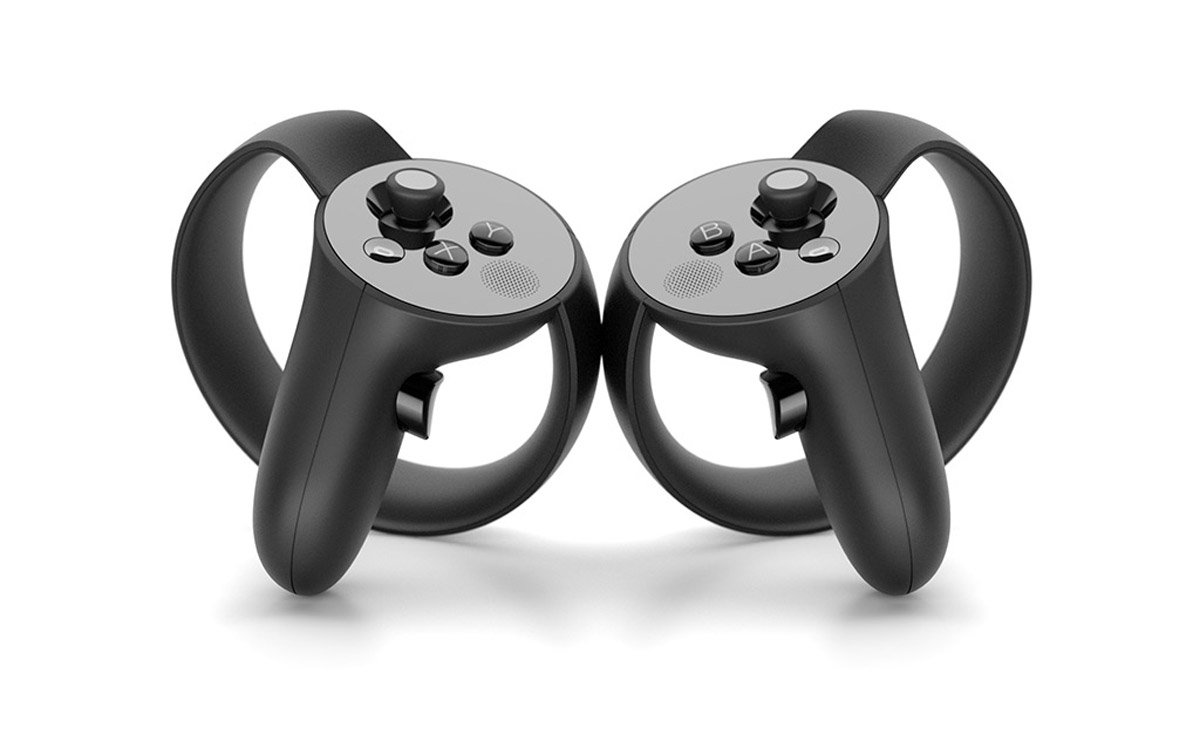
I bought an Oculus Rift back in October and I’ve been enjoying it, playing whatever I could find that worked well with a VR headset and controller. My favorites are House of the Dying Sun and Lunar Lander. (Elite: Dangerous is also great but I’m terrified of destroying my ship repeatedly and becoming penniless.) I pre-ordered the Oculus Touch controllers and they arrived a few days ago. I’ve been playing Touch games constantly since I got them and the experience is absolutely incredible.

I’ve played games with an HTC Vive at a friend’s house and they were always a lot of fun. Vive’s wands have a good feel and are easy to use. And while the Touch controls have similar inputs (trigger, grip, control pad/stick, a few buttons), the way they feel in a game is significantly different. The Vive wands are represented in VR as a device you’re holding (similar to the wands themselves), while the Touch controls are represented as your own hands. These virtual hands mimic your real hands around the controller. It sounds like it might be a little weird, but the controls are so well done that it works out incredibly well.

The accuracy of the virtual hands hit me when I was talking to my girlfriend in my living room. I was in the Oculus Home app (after playing Bullet Train) and I turned to talk to her, looking through the gap around my nose. I was gesturing toward her, and I noticed that where my real hand ended, the virtual hand began, and it was matching my gesture perfectly. I was pointing toward her, and my virtual finger was pointing just like my real hand. It was incredible. I moved my hand a bit and the virtual hand was matching the position and gesture pretty accurately.

In games made for the Touch controls, you can really start to feel like your hands are in the game. Holding weapons just feels right, whether you’re holding a handgun, a rifle, a bow, or a sword. Gestures can be done with broad motions or pointing. You can communicate with other players by pointing (👉), thumbs-up (👍), or OK’s (👌). I saw two players fist-bump. Then I learned I could make obscene gestures (👉👌). It’s awesome. Playing games designed for Vive’s wands don’t have quite the same level of interaction.

The only downside to the Touch controls are the downsides to the Oculus itself. The cameras certainly aren’t as good for room-scale, and their tracking isn’t as precise as the Vive. For games that are mostly forward-facing (and many games are), the Oculus works perfectly fine, and the setup with two cameras along the same wall is a bit more convenient than Vive’s opposite corners setup. You can still look around or behind you, but interacting with things directly behind you can be an issue if you hide a controller from one of the cameras. However, the precision is generally good enough, and most games tend to keep you facing forward, so these downsides are relatively minor.

Overall, I enjoy the Touch controllers more, but honestly, both HTC and Oculus have great VR products. UploadVR has a comparison of the controllers from back in June that I’ve found pretty accurate.

Now I’m eager for Steam’s winter sale so I can stock up on VR titles…

Categories
Life

I bought a MacBook

About a week ago, I bought a new MacBook Pro. It’s been years since I’ve owned a laptop (over a decade) and I’ve wanted one for a while – I need a Mac to publish apps for iOS and my old Mac Mini is cumbersome to use for that purpose; a MacBook is much more convenient. I’ve also never really used a Mac before. I mainly used my Mac Mini as a media center, so I rarely interacted with the OS. With all that in mind, I decided I’d do some blogging about what I like, what I don’t like, and what I experience as I get used to my expensive new toy.

I’m going to start with my favorite feature thus far: the “Force Touch” trackpad. While I’m not sure about the name (feels to Star Wars for me), I love the device. I know it’s completely stationary, but it does a great job of making it feel like it’s clicking. The extra “deep” press also provides a new way to interact with things and it’s great where it’s used… Which is the only downside: there are very few places where that extra interaction is actually made useful. With that said, however, the trackpad works great – it feels amazing and works wonderfully.

I’m also loving the multiple desktops and “Mission Control” view of all my desktops and windows. It’s easy to set up and use, and I’ve already organized different desktops for different tasks. My only disappointment is that I can’t name the desktops to help me organize; “Desktop 1” through “Desktop 4” is kind of boring. (For what it’s worth, the next update for OSX, El Capitan, seems to include this feature.) Switching between them is a breeze, though.

I started out hating “Launchpad”. I’ve never been particularly fond of the iOS home screen (I don’t think the wall of icons is a particularly elegant view), and I didn’t think a desktop OS would benefit from it. After using it for about a week, I’ve grown used to it. I see it as a replacement for the old “Applications” folder – just a list of all your applications. It’s customizable enough, though some apps create duplicate icons (I’m looking at you, Blizzard) which is annoying because there’s not an easy way to remove them. Steam has issues getting icons set up properly too, so it needs a lot of babysitting to get the icons to show up properly. The Dock still holds the apps I use most often, so I don’t have to visit the Launchpad unless I’m opening an app I don’t use very often.

The hardware itself is fantastic. Fast, light, durable, and pretty. The speakers sound good and the display is beautiful. The power adapter is wonderfully designed (definitely the best cable management in an adapter that I’ve seen). The MagSafe connector works fine. I’ve very rarely had a problem with tripping over cables but I know I’ll be thankful when it eventually happens and it keeps me from yanking my laptop off a table.

In fact, my only major annoyances so far have been with XCode, but I’m planning a separate post for that. I’ll post more in the next few weeks if I find anything new I especially love or hate, but overall I’m happy with the new laptop.

Categories
Development Projects

Spaaaaace!

It’s been a while since I’ve touched Unity; mostly because work has been rough and my desire for non-work coding has been nonexistent. But I’ve been toying with some ideas and I wanted to actually try doing something new, so I downloaded some updates, cracked open Unity, and started a new project.

That's a moon.

My close friends know how absurdly crazy I am about space in general. On top of that, I’ve been wanting to use some “real” math again (business applications rarely involve much math). So on Friday, after talking with a coworker a bit, I decided I was going to program a solar system simulator this weekend. And while the result isn’t exactly what I wanted, it works and it’s something I can expand on.

A pretty moon with its planet in the distance

To start, I knew I’d need something to generate pretty planets, and I recently saw a planet kit advertised on Unity’s Twitter feed. It does a good job in general, even with the free version of Unity. There are several places where some more advanced effects don’t work (thunderstorms on planets, city lights at night, and the lighting quality in general in a few places), but from what I can tell, it’s just because I can’t use Unity’s deferred lighting mode. The stars in particular don’t look as great as they could. After getting the new planets imported, I set up a quick PlayMaker script to generate a simple solar system.

A ringed gas giant. Likely far too close to that blue star.
Likely far too close to that blue star.

When I say “simple solar system”, I mean just that: a random number of planets, with a random number of moons orbiting at random angles and rates. Took all of an hour. I didn’t even have to program orbits – the planet kit I bought actually has a script that makes planets and moons orbit. Not realistically, but it’s something, at least.

These planets are too close to that star.
Definitely too close to that star.

My next goal is to write a more complicated generation script that’ll generate a more realistic system, and some new code to handle orbits more realistically. After doing a little reading on how Kerbal Space Program implemented orbital mechanics (patched conic approximation), I’ll probably start with something similar since that’s a much simpler model. I’ll also take some time to read the entire Wikipedia entry on orbital mechanics and see if I can recall some trigonometry.

Categories
Miscellaneous

The Scientific Method Isn’t Obsolete

Yesterday on NPR I heard a story about medicine, treatment, and “Big Data” where someone said:

…the scientific method itself is growing obsolete.

I’ve seen this same sentiment where I work by some of our statisticians. Before I get into why this is wrong, let’s get some definitions. First, the scientific method, from Dictionary.com:

a method of research in which a problem is identified, relevant data are gathered, a hypothesis is formulated from these data, and the hypothesis is empirically tested.

And now the definition of statistics, again from Dictionary.com:

the science that deals with the collection, classification, analysis, and interpretation of numerical facts or data, and that, by use of mathematical theories of probability, imposes order and regularity on aggregates of more or less disparate elements.

Time to cherry-pick parts of those definitions to support the point I’m trying to make: the scientific method provides empirical evidence for a hypothesis via testing, whereas statistics interprets data using probability. In short: statistics tells you whether or not something might be true, while the scientific method (experimentation) tells you whether or not something is true.

That’s probably oversimplifying, since even within science there are levels of certainty – we know things are probably true or probably not true based on the data generated from experimentation. And that shows that experimentation and statistics aren’t separate things: they rely on each other. But I’ve been hearing some people (people I would assume are normally intelligent people) forget that statistics deals with probability, not certainty; seemingly assuming the data we have is all the data we need. Where I work, someone actually said: “We can know whether or not a test will pass without ever running the test!”, as if statistics was some sort of magic crystal ball. A colleague corrected them, saying it would indicate only that a test would probably fail – the only way to know a test would pass is to run the test. Imagine buying any product where no testing was performed, but it was designed entirely via a statistical analysis of already-collected data. I’d much rather someone do some testing first to make sure that product is safe before it’s sold to me. That’s the only way to be certain it’s safe. (Or at least mostly safe.)

The Merriam-Webster encyclopedia definition of statistics says it very well:

Statistics provides ways to design efficient experiments that eliminate time-consuming trial and error.

And there it is: statistics (data analysis) doesn’t eliminate the need for experimentation or make it obsolete; statistics helps experimentation by weeding out poor hypotheses – and even supporting good hypotheses. Without the experiments, you don’t get any more data. Thinking we have all the data we need and don’t need to collect any more is a dangerous idea. Experimentation is vital for statistics. Likewise, statistics is vital for experimentation – being able to interpret the results is important. If we all keep in mind that statistics can guide experimentation and not replace it, I think we’re on the right track.

Categories
Games

Games of 2014

The last time I blogged the games I played was way back in 2011. That was fun, but I didn’t keep track as well in 2012 or 2013, but for 2014 I decided I’d keep track in a blog post so I’d be ready come the end of the year. Here’s my list of games played in 2014, categorized by platform. Since the PC list is enormous, I saved it for last.

Legend
🌟 Beat the game.
🏆 100% cleared the game, including all achievements.
👍 Recommended if you haven’t played it.
👎 Avoid it. It’s terrible.

PS4
Assassin’s Creed 4: Black Flag 👍
Started in 2013, beaten in 2014. This game was so great, I wrote a review for it.

PS Vita
PlayStation All-Stars Battle Royale
Tearaway

3DS
Fire Emblem: Awakening

PC
Star Trek Online
CastleStorm
Evoland
Company of Heroes 2
Hammerwatch
Delver
Dead Space 3  🌟
Starbound
Broken Age 👍
StarCraft II
Played ranked for the first time and found out I’m terrible. (Not that it was a surprise.)Starpoint Gemini 2
SimCity / Cities of Tomorrow
Came back to this game after a long break (because it was so disappointing at launch). It seems most (if not all) of the early problems have been fixed, and the promise of offline play finally made me return. Cities of Tomorrow is a fun expansion, though at $30 it’s definitely overpriced.

Categories
Development

Business Apps Aren’t User-Friendly Because of Business

I read a great article a few weeks back about making business applications user-friendly. The basic idea is that most business applications are designed to serve the needs of the business and not the needs of the user. It’s a fantastic article and if you develop business applications, you should read it.

I completely agree with the premise: if we want business applications to be pleasant to use, we need to spend time on interaction design, learning from users, prototyping and iterating. In my experience, however, the “business” just doesn’t care about how user-friendly the software is. And unfortunately, they’re paying the bills.

There are downsides to this way of thinking. Applications that aren’t user-friendly bother people. They erode their happiness and make their work a chore. It slows them down, and that actually has a direct impact on the bottom line; it’s just difficult for managers to understand that.

As developers and designers, we can solve the problem. We’re perfectly capable of providing a piece of software that not only gets the job done, but does it quickly and in a way that users enjoy using. But doing that takes time, and at my current employer, the dictate is: “Just get something out there. We’ll make it nice later.” But I know as well as they do: later never comes. So we end up stuck with applications that are so unfriendly that even some of the developers hate using them.

I work for a company where research is a priority. We’re developing an application to replace their existing research application, which basically drives the entire research side of the business. We’re fixing data problems, improving the interface, and trying to make it more user friendly. But this time constraint means I can’t produce my best work. When I’m crunched for time, I can’t spend the time it takes to produce an application that works exactly how the user needs it to work. Instead, I have to cater exclusively to getting the job done. The business’ needs take priority over the user needs.

Until businesses realize their own employees’ needs are more important than just shoving a tool in their hands, this isn’t going to change. There’s little a developer or designer can do to change the mindset. All we can do is make small pushes in the right direction when opportunities arise.

Categories
Development

You should write more unit tests

I write a lot of unit tests. There have been some days when I spend more than half the day just writing tests. I haven’t fully adopted test-driven development, but I know the value of unit tests and want to make sure my code is covered. There have been times in the past when I haven’t written as many tests, and when I finally do take the time to cover that code with tests, I inevitably find some problem with it. Writing tests not only helps me clarify the process of doing something in my code, but it makes my code more easily extensible and testable.

We’ve hired a few new developers where I work, and they always react with astonishment when I tell them how many tests I have and how much code is covered by those tests. This is a bit upsetting. They’re writing tests, but most of what they write are integration tests: tests that make sure the various bits work together. They don’t have many tests that simply make sure some small piece of code is doing what it should. Their integration tests are good to have (I’m not arguing against integration testing), but unit tests are quick to run and provide a safety net to maintain a healthy codebase and track down bugs when they happen.

To illustrate my point, let’s take some pseudo-code for a real-life example:

public bool CanEdit
{
    get { return this.CanPerform(AuthorizationAction.Edit); }
}

This is a simple C# property that returns a value indicating if I can edit the class it’s attached to. The server tells me what I’m allowed to do, and I’m simply exposing that through this property. A unit test might look something like this:

public void CanEditTest
{
    var obj = new Thing();
    obj.Authorizations.Add(AuthorizationAction.Edit);

    Assert.IsTrue(obj.CanEdit);
}

This all looks pretty basic, and you’d be right: it’s about as simple as things can get. One might ask, “That code is very simple and straightforward. Why do I need to write a test for it?” Well, consider that I write a lot of these authorization properties and they all follow the same structure, so I do a lot of copy/pasting and rename them. Occasionally, I’ll forget to change the action I’m checking for in the “CanPerform” part. This test makes sure I don’t forget, and since this test runs every time I check-in code, it makes sure I never accidentally break it.

A coworker once told me, “it looks like you’re making sure you don’t change anything.” I was a little surprised. Of course I’m making sure I don’t change things, I thought, I know it works. I don’t want to change it. Refactoring is fine, and wouldn’t break the test. But if we completely change something – say we completely change how authorization works – these tests should fail. You’ve changed how something works, of course you’ll need to update the tests.

Part of the problem is that most developers seem to think of unit testing as extra work, but that’s not the case. It’s a developer’s responsibility to make sure they code they write works. If you’re not writing tests for it, you can’t be confident that it actually works. You can’t be confident that someone else will make a change that breaks it. And you can’t rely on a QA tester to catch everything you missed. Be a good developer: write unit tests.

Categories
Development

Why time matters in software development

I don’t often write posts about my work life, but I feel like I’ve been complaining to my coworkers and superiors about the same few problems over the past few months and I wanted somewhere to write some things… So here we are.

I’m going to start with a simple premise:

Good software is as much an art as a science. Good art takes time.

This is something few people outside of the software industry seem to understand. I don’t write commercial software, but I write line-of-business applications for my company. We’re a small team – currently around 10 developers – and we’re tasked with writing new software to solve various problems and help everyone work more efficiently. We tend to do fairly well, but the team is so small the work comes in faster than we can complete it, and the focus has shifted from doing things right to doing things fast. While I can understand the need to get things done quickly, I’m disappointed that we’re not trying to create good software anymore. I want to take pride in my work; I want to be able to show someone something I’ve worked on and be happy to say “I made this”. When someone comes to me and tells me my software is causing problems, that’s a failure on my part.

There are many cliches that apply to software development, but one I use repeatedly is the 80-20 rule, because it can be applied almost anywhere. For instance: “20% of the work takes 80% of the time.” I usually call that 20% “polish”. This was a bad idea: now my boss wants to cut out the “polish” and just leave things part-done or with a terrible user experience.

I’m sure I’m not the only developer in a situation where getting things done fast is more important than getting things done right, and I’m sure I’m not the only developer who would prefer to take the time to create a fantastic piece of software over just shoving something out there.

Think about most of the software you actually enjoy using. It’s probably not a line-of-business application. It’s more likely to be something social, something easy to use, something that just works. I’d be willing to bet the teams creating that software didn’t start off saying, “We’re going to publish this in a year.” They probably started with a simple idea, implemented it, then iterated on that idea, gradually improving it over time until it was ready. If they had arbitrarily chosen a deadline, it wouldn’t be as great as it is. And we’re not talking about software that doesn’t make money. We’re talking about software from places like Facebook and Google and Apple and even occasionally Microsoft (I like Excel).

Categories
Projects

Octal – Tunnel Racer Reborn

I’ll start with a quick recap. Back in March 2013 I started working on a new project I called Tunnel Racer. It was a basic tunnel racing game that I created simply to try out some new software in Unity. I made a ton of progress very quickly and had a working game in no time – I even let a few friends play it on my iPhone and iPad at PAX that year. In May, I was contacted by a couple guys in California starting an indie game studio called Homunkulus, who had a concept for a game very similar to what I had created. We decided to team up, using my work to quickly get something working for their project. The working title has changed a few times, but we’re currently using the name Octal.

While I haven’t worked as quickly on the new project, I’ve made several changes to move my work closer to the vision for Octal: there’s updated tunnel graphics, new abilities and controls, and an entire system for level generation (along with a simple Windows app to quickly create levels). Now for the good stuff: screenshots.

Updated Tunnel Graphics
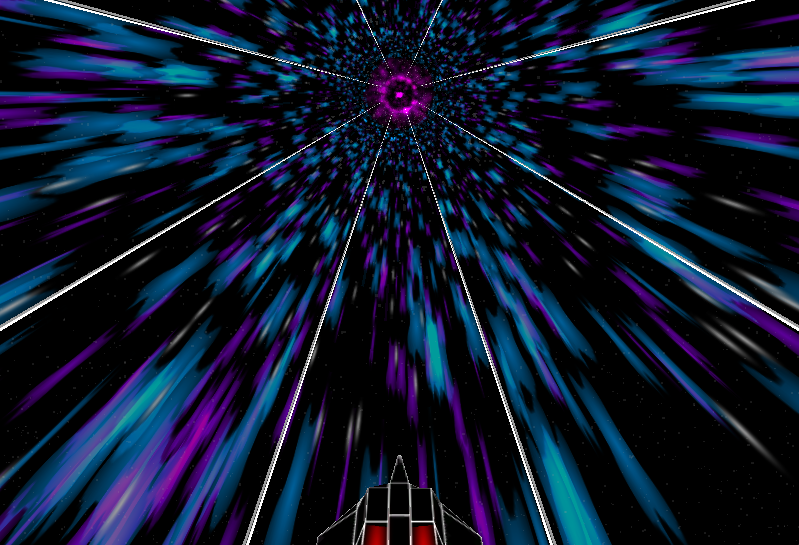
In Tunnel Racer, the tunnel was a static 8-sided cylinder that the player’s ship circled. In Octal, the tunnel sides are generated in rings (much like the obstacles) and are semi transparent, allowing the new tunnel graphics to show through. Those new tunnel graphics are the best part, and really make the game pop:

Octal’s fancy blue-and-purple tunnel

In Octal, you’re racing a ship through a wormhole. When I think wormhole, I think purple and blue for some reason. There are a few layers to the tunnel effects, so there’s some nice parallax scrolling going on around the tunnel.

New Abilities and Controls
Unlike Tunnel Racer, where your ship simply steered left and right through obstacles, your ship in Octal has two abilities: boost and jump. Holding the boost button on the right allows you to increase your speed, which is important for score and completing the level. Like Tunnel Racer, you’re racing away from something; in my case it was a giant explosion, but in Octal you’re simply trying to remain inside the wormhole. Moving too slowly drops you out of the wormhole and you lose. Boost can be gained by maneuvering through certain obstacles in the game. Jumping is used to dodge obstacles, but can be held to maintain a hover, allowing you to glide over longer obstacles.

It’s not a pretty UI, but it’s something to start with.

In addition to the new abilities, Octal uses an accelerometer-based control scheme. I could never get the left/right tapping controls to work quite right, so this is probably a good change.

Levels and Level Generation
Finally, there’s support for custom-designed levels. The levels in Octal are like circuits in other racers. Each circuit has 8 levels, which will be designed using a custom program I wrote. It’s a really simple application where a user can “paint” a track and specify settings for certain variables in the obstacles on the maps (like a cycle time or animation type). Everything is stored in a simple binary file that is read by the game at runtime.

Octal's level designer
Octal’s level designer.

More to come…
I’ll be posting more in the coming weeks now that I’m back to doing some real work on Octal. I have some ideas about the UI that I’d like to try out and some things on my to-do list that I haven’t gotten around to yet. And there’s still plenty to say about the game itself and the problems I’ll face as I continue to work.