It’s been a while since I’ve touched Unity; mostly because work has been rough and my desire for non-work coding has been nonexistent. But I’ve been toying with some ideas and I wanted to actually try doing something new, so I downloaded some updates, cracked open Unity, and started a new project.
My close friends know how absurdly crazy I am about space in general. On top of that, I’ve been wanting to use some “real” math again (business applications rarely involve much math). So on Friday, after talking with a coworker a bit, I decided I was going to program a solar system simulator this weekend. And while the result isn’t exactly what I wanted, it works and it’s something I can expand on.
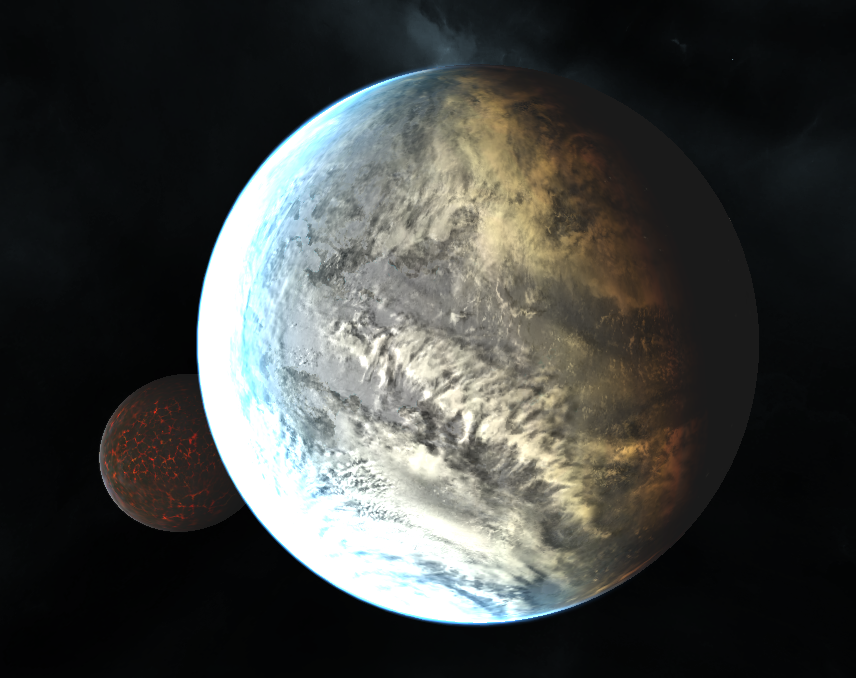
To start, I knew I’d need something to generate pretty planets, and I recently saw a planet kit advertised on Unity’s Twitter feed. It does a good job in general, even with the free version of Unity. There are several places where some more advanced effects don’t work (thunderstorms on planets, city lights at night, and the lighting quality in general in a few places), but from what I can tell, it’s just because I can’t use Unity’s deferred lighting mode. The stars in particular don’t look as great as they could. After getting the new planets imported, I set up a quick PlayMaker script to generate a simple solar system.
Likely far too close to that blue star.
When I say “simple solar system”, I mean just that: a random number of planets, with a random number of moons orbiting at random angles and rates. Took all of an hour. I didn’t even have to program orbits – the planet kit I bought actually has a script that makes planets and moons orbit. Not realistically, but it’s something, at least.
Definitely too close to that star.
My next goal is to write a more complicated generation script that’ll generate a more realistic system, and some new code to handle orbits more realistically. After doing a little reading on how Kerbal Space Program implemented orbital mechanics (patched conic approximation), I’ll probably start with something similar since that’s a much simpler model. I’ll also take some time to read the entire Wikipedia entry on orbital mechanics and see if I can recall some trigonometry.
I’ll start with a quick recap. Back in March 2013 I started working on a new project I called Tunnel Racer. It was a basic tunnel racing game that I created simply to try out some new software in Unity. I made a ton of progress very quickly and had a working game in no time – I even let a few friends play it on my iPhone and iPad at PAX that year. In May, I was contacted by a couple guys in California starting an indie game studio called Homunkulus, who had a concept for a game very similar to what I had created. We decided to team up, using my work to quickly get something working for their project. The working title has changed a few times, but we’re currently using the name Octal.
While I haven’t worked as quickly on the new project, I’ve made several changes to move my work closer to the vision for Octal: there’s updated tunnel graphics, new abilities and controls, and an entire system for level generation (along with a simple Windows app to quickly create levels). Now for the good stuff: screenshots.
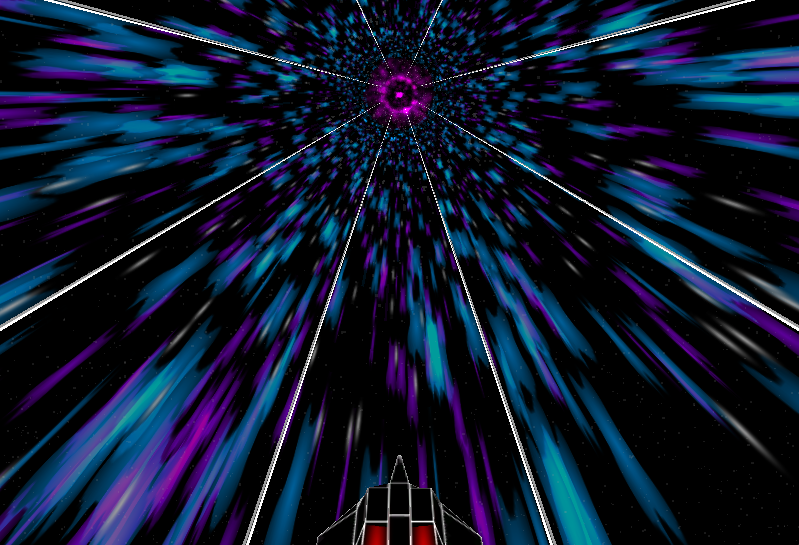
Updated Tunnel Graphics In Tunnel Racer, the tunnel was a static 8-sided cylinder that the player’s ship circled. In Octal, the tunnel sides are generated in rings (much like the obstacles) and are semi transparent, allowing the new tunnel graphics to show through. Those new tunnel graphics are the best part, and really make the game pop:
Octal’s fancy blue-and-purple tunnel
In Octal, you’re racing a ship through a wormhole. When I think wormhole, I think purple and blue for some reason. There are a few layers to the tunnel effects, so there’s some nice parallax scrolling going on around the tunnel.
New Abilities and Controls Unlike Tunnel Racer, where your ship simply steered left and right through obstacles, your ship in Octal has two abilities: boost and jump. Holding the boost button on the right allows you to increase your speed, which is important for score and completing the level. Like Tunnel Racer, you’re racing away from something; in my case it was a giant explosion, but in Octal you’re simply trying to remain inside the wormhole. Moving too slowly drops you out of the wormhole and you lose. Boost can be gained by maneuvering through certain obstacles in the game. Jumping is used to dodge obstacles, but can be held to maintain a hover, allowing you to glide over longer obstacles.
It’s not a pretty UI, but it’s something to start with.
In addition to the new abilities, Octal uses an accelerometer-based control scheme. I could never get the left/right tapping controls to work quite right, so this is probably a good change.
Levels and Level Generation Finally, there’s support for custom-designed levels. The levels in Octal are like circuits in other racers. Each circuit has 8 levels, which will be designed using a custom program I wrote. It’s a really simple application where a user can “paint” a track and specify settings for certain variables in the obstacles on the maps (like a cycle time or animation type). Everything is stored in a simple binary file that is read by the game at runtime.
Octal’s level designer.
More to come… I’ll be posting more in the coming weeks now that I’m back to doing some real work on Octal. I have some ideas about the UI that I’d like to try out and some things on my to-do list that I haven’t gotten around to yet. And there’s still plenty to say about the game itself and the problems I’ll face as I continue to work.
But there’s no need to mourn Tunnel Racer. See, I was contacted by a couple guys in California who have started a little indie game development company called Homunkulus. Their lead designer had an idea for a tunnel racing game and when they were doing a little research on their “competition”, they stumbled upon Tunnel Racer and liked what I was doing.
We chatted over Skype a few weeks ago and I really liked their ideas. When I started Tunnel Racer, I was just going for a simple “endless running” game with a retro art style. The guys at Homonkulus have a much more fleshed-out game design, and what I’ve done with Tunnel Racer actually fits into it quite nicely.
So, we’ve decided we’re going to work together to create this tunnel racing game of theirs and publish it. They’ll be adding to the game and handling a lot of the bits I’m no good at (sound, some art, and businessy stuff), and I get to continue working on this tunnel racing game.
Together, I think we’ll make a much better product sooner, and I think my work gives them a good head start, so we all benefit. I’m excited to work on this new game, but I’ll have to hash out with them what details I can provide here… I’d like to keep blogging about Tunnel Racer, but this is their baby as much as mine now, and I’m not sure how much they want me tossing out here on the interwebs. Likely anything specific will be posted to their website, as I have my very own username and password and everything! If anything, I might just post some asides here.
That said, I wanted to throw the final version of Tunnel Racer up here: version 28a. It was in a sort of weird, halfway-ready state when I stopped, so this version has some odd bugs, like the progress bar doesn’t work quite right.
I’ve decided to be a bit more organized with these updates, so this post has the organization I’m planning on using for a while – a short blurb at the top, the link to the current version, a change list, a bug list, and then brainstorming. This should make it easier to get to the interesting stuff. With that said:
Updated the progress bar so it’s a single, smooth progress bar. There were two progress bars previously – if you looked closely you could see a line dividing them. This change should make the progress bar look smooth no matter the resolution.
Switched to a new turning animation. It’s more boring than the old but less error-prone.
Added options menu and options for music and sound. They don’t do anything yet. The checkboxes will enable/disable music or sound entirely and the sliders will adjust volume. I’m thinking the checkboxes aren’t necessary and I could just use the sliders, though.
Changed the “GO” button to a “START” button (to fill out the button better) and changed the font. It’s a little fuzzy now because I’m stretching the font, but I’ll likely replace it with a properly-sized font in the future.
Bugs
Brainstorming
I keep comparing Tunnel Racer to other games I see on the App Store and I get a bit disheartened – I have no idea how I can compete with them. But I forget that this isn’t supposed to a Zynga-toppling mobile game… It’s an experiment and learning experience. I’ve been successful in that regard. I’ve learned a lot, got to learn an entirely new way to program games, and I’ve gotten some experience working with animations.
I want to get this finished and move on to something else, though, so I think the current feature set is going to be it. Four mutators, five ships. Simple, quick to play.
It’s been awhile since I made an update (a month?!), and I’ve been sitting on these changes for a while, so I figured I’d finally post an update.
Changes this version:
The progress bar and explosion move smoothly, rather than jumping to their intended position.
Updated the Accelerator mutator. Instead of gaining speed when ending levels, you gain speed over time.
Removed the level-end sound effect. I still want something to play when ending a level, but I don’t know what yet, and I hated the sound I was using.
Updated the main menu with new mutator descriptions and removed the health stats from the ships.
The speed rating of ships now factors into how much distance you gain when hitting a booster.
Updated most of the spawn patterns that started with boosters so the boosters are now optional and have the same chance to spawn as they do elsewhere (i.e., rarely).
Removed Blitz as a ship option and updated speed values. (I thought Blitz had the most boring ship design.)
Redesigned Alpha.
Removed the testing options on the main menu.
Reorganized the ships on the main menu so they’re ordered by speed.
Added a brief speed boost when picking up a booster, and an animation to go with it. I also changed the boost effect on Alpha – a spray of yellow (to match the boost pickup color) out the engines. I’m not satisfied with it yet, though, and it’s hard to see.
And since I just played it and found some new bugs…
The player and explosion don’t seem to be moving at the same rate. They should always be equidistant from the center of the screen. I think I’ve got a math bug somewhere.
Sometimes you’ll hit a panel that you shouldn’t when changing lanes. (For example: if the lanes are “1-2-3”, changing from 1 to 2 will sometimes hit a panel in 3 as your ship banks.) This bug has been around awhile, but I’m still having trouble getting rid of it.
I like the new mechanics more than the old, so I’ve started ripping out some of the old code and cleaning things up. I’m still trying to get the feel right, though. I need to figure out the best way to handle the speeds, because once things get going pretty fast, collisions start to fail (your ship can glide over panels without hitting them), animations will twitch (resulting in accidental collisions), and other problems start to crop up… I think I might just need to find a better way to control all the animations that occur as you move around.
Brainstorming UI
I need to figure out what options I’m going to allow on the right-side of the main menu. My plan has always been to put the mutators on the left and some game options on the right (like sound/music options), but I don’t know what options I’m going to add. Sound and music settings are obviously important, but what else?
Animations and Effects
I’m still playing with effects – trying to find something that looks good, but isn’t too “loud” is a lot more difficult than I expected. I need some new sound effects, but I don’t know where I want to go with the graphics and sound – realistic or retro? I’ve been using a “retro” theme for everything thus far, but I can’t find an explosion or fire sound effect that doesn’t sound annoying…
The animations when the ship changes lanes, jumps, and boosts are all nice but cause some problems. I need to figure out some way to improve how they work to make them more fluid, and I need to figure out a way to prevent collisions with panels that shouldn’t be hit (like I mentioned in the bug list above).
Player Progression and Achievements
I’m going to start working on implementing ship unlocking and achievements with the next version as well, since these are going to be critical for the final game, and some testing is going to be needed to determine a good progression for unlocking ships.
Tonight’s update is pretty minor. I’m still playing with the new mechanics, but I think I like where things are headed.
Changes this version:
Levels 2+ are shorter.
Boosters have a lower chance to spawn. (Only applies to the places where they can appear randomly, like during the spiral and random patterns.)
The “difficult” patterns (walls and deltas) have a slightly higher chance to spawn.
The health UI has been hidden.
Health pickups have been disabled. (Though sometimes it looks like a health ring will spawn.)
The speed UI has been hidden. It doesn’t really mean much now that speed is locked during each level.
The Doom mutator has been updated so the explosion is constantly gaining on you.
The Sudden Death mutator has been updated so the explosion starts very near you, and a single hit causes it to catch you. (The opening animation doesn’t work out so well yet.)
The Turbo mutator has been updated so you start at max speed and never slow down when hit.
The “near-death effects” (UI shaking, red border) have been updated to display at the same time the warning symbols and skull-and-crossbones appear.
I’ve got plans for the Accelerator mutator, but it’s a bit more involved to change, so I want to get some testing in on the new mechanics before I go in and start making major changes.
And some random brainstorming: UI
If I decided to ditch the speed and health UI elements because of these gameplay changes, then I’ll probably rearrange the UI – maybe put the pause button in the upper-right and the distance bar between the score on the left and the pause button on the right. This would free up a bit of space.
Ships
If health disappears, it means there’s really no need for more than 5 craft if I keep the 1-5 rating for speed. Since there are currently 6 ships, one would likely get dropped, or I’d have to come up with a new reason to have more than 5. I don’t think losing a ship would be a huge loss, but I had been thinking about maybe offering ships as DLC. If there’s no use for more than 5 ships, ship DLC doesn’t make much sense.
I think it’s time for a huge mechanic change, don’t you?
I’ve been thinking about how the game plays and I haven’t been very satisfied, so I thought about it a while and decided to simplify some things. When I introduced the different ships, it made my job a lot more complicated because each ship has different speed multipliers, which makes balance a huge pain – the movement has never felt quite right. Also, the speed levels usually felt too slow or too fast – there was never the “just right” feeling. And now that the giant explosion is in there, I have a few new options for gameplay and decided I’d try something new.
Here’s a list of the mechanic changes in this version:
The only way to die in this version is for the explosion to catch up to you.
Health is disabled. (It shows up, you just don’t lose any health.)
You start the game at what used to be speed 3.
You speed up a bit each level. At level 10, you’re moving at what used to be speed 5.
When you’re hit, you drop to what used to be speed 2 for about a second, then return to full speed.
When you’re hit, the explosion gains on you.
When you pick up a booster, you increase your distance from the explosion.
Each level increases a multiplier applied to the explosion’s speed. There’s currently no maximum speed for the explosion. The multiplier increases by 10% of the base speed each level, so at level 10, the effect is doubled, and at level 20 it’s tripled.
Each level decreases a multiplier applied to your boost speed. Your boost speed decreases by 5% of your base speed each level. The minimum is 10% of the full effect at level 18.
There are a lot of things that will change as I figure out how to balance everything again. In the end, each ship’s speed stat will determine their base speed. Faster ships will be easier to play because they’ll get a bigger boost from each booster. I don’t know if health will return. I think having health and this new boost mechanic conflict with each other, so it’s likely health will disappear entirely. If that happens, several of the mutators will have to change, but I’ve already got ideas on how to modify them to make them work again. (I didn’t bother making any changes to them in this version.)
I’ve mentioned PlayMaker a few times in the past and how I was excited about what could be accomplished with no code. I haven’t explained what I meant by “no code”, so this post is here to clarify what I’m talking about.
Traditionally, developers use a programming language and write code. It may look something like this:
public void TotallyLegitimateExample(string something)
{
    if (something == "whatever") DoWhatever();
    else if (something == "nothing") DoNothing();
    else if (something == "") Panic();
    else Die();
}
OK, that’s a stupid example, but it gets the point across – code is typically all text typed out by someone in a particular language to accomplish some task. As a more real-world example, let’s pretend I’ve got some code to control the main gameplay loop for my game:
public class TunnelRacerMainGameLoop
{
    public void Start() { ... }

    public void StartGame() { ... }
    public void StopGame() { ... }

    public void PauseGame() { ... }
    private void Pause() { ... }
    private void Unpause() { ... }

    public void LevelComplete() { ... }
    public void PlayerKilled { ... }
}
Obviously I’ve left a lot of the details out but hopefully that gives you an idea of how one might separate and code the game loop. Those methods would call out to other things to manage the state of the game.
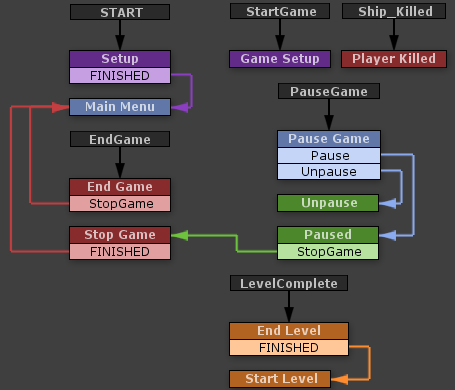
The entire flow of the game is represented visually. I’m handling events sent by other finite state machines (FSMs) in this loop. For instance, when you click the “GO” button on the main menu, it sends a “StartGame” event to this FSM. (This FSM, in turn, notifies others that the game has started.) When you click the pause button, this FSM gets the “PauseGame” message.
The actual logic is contained inside those states. For instance, in the “Pause Game” state, this is what happens:
Now before your eyes glaze over and roll back in your head, let me try putting that in code:
public void PauseGameClicked()
{
    if (IsPaused) Unpause();
    else Pause();
}
That isn’t so bad, right? What’s the big deal with all this visual programming garbage, anyway? The thing is, it’s very quick and easy to move things around, rewire them, modify their behavior, or reuse that behavior. These are all things that can be accomplished with code, but we’re visual creatures – displaying it this way makes much more sense and it’s much easier to see what’s going on immediately without having to read through pages of code. This really becomes beneficial when you start getting to more complex FSMs:
Tunnel Racer’s “Health Manager”
I would hope someone without programming skill could get a decent idea of what’s going on there. It’s also very pretty. (Maybe just to me.)
Unity already encourages you to write your code in small, reusable chunks, but PlayMaker takes that a step further with its “actions”. Here’s what happens when you pick up health (“Add Health”):
This is where some programming knowledge comes in. “Float Add” probably doesn’t mean much to most people, but programmers would understand that “Float” means a floating-point type. (In Unity’s C# case, literally the “float” type.) The first action (“Float Add”) adds 1 to a global variable called “Player_Health”. The next action, “Play Sound”, is pretty self explanatory (it plays a sound). The two “Send Event” actions send events to other FSMs. The first action tells the player’s ship that the player has been healed (the “Player_Ship” FSM fires the healing effect). The second action tells the “UI Effects Manager” to stop shaking the UI (which happens when you’re near death). Once those actions are complete, the FSM follows the “FINISHED” event out of “Add Health” to “Update UI”, which updates the health bar in the UI, and then continues along to checking your health, updating effects or killing you.
Hopefully that’s enough to describe what I mean when I say “no code”. I’ve written a few of my own actions for PlayMaker in the last week or two, and I plan on writing several more to simplify some of the actions I keep repeating. Because of the way PlayMaker works, any action I write for Tunnel Racer can be carried into a new project, so over time I’ll slowly build up a nice library of actions to use.
Now, there are some tradeoffs. Certain things that would be simple in code may require multiple actions. For instance, loops are a bit more difficult because you need to manage and wire extra variables in the FSM, whereas in code it’d be a bit cleaner (you still need to do exactly those things, but in a much more compact fashion). In general logic control flow (basically just control loops like “for”, “while”, etc) are more difficult to accomplish, but that’s a minor issue. (And it can likely be alleviated with some custom actions.)
It’s also important to note that I’ve only scratched the surface. FSMs in PlayMaker can get truly huge – imagine a dialog tree in an RPG or a strategic AI for an RTS. They could be enormous, with hundreds of states and thousands of actions. I prefer simplicity, however, so I split up my FSMs whenever they start to become unwieldy. PlayMaker is really impressive in how well it works and how easy it is to use. I’ll definitely be using it in future projects.
Nothing major in this update, but I fixed a gigantic bug where the spiral pattern could start with the first ring being in the wrong orientation, making it impossible to navigate. Oops.
I also added the last of the patterns I had planned, the “Delta” pattern. I haven’t been able to capture a shot of it in-game, so this will have to do:
   X
  X X
 X   X
I updated a few graphics that I had oddly scaled in the last version and shrunk the “LEVEL XX” text so it isn’t as huge and distracting as it was before. I fixed the near-death screen border effect – again. (I have no idea why it’s breaking so often…)
Well, that was quick… I made a lot of progress today. I expected the changes I had planned to take a few days and that I would likely finish them up this weekend. Instead, things have been pretty easy to modify, so practically all the changes I had planned are already done.
As I noted yesterday, I’ve removed the level intermissions (the short time when you’re cruising with nothing to do). Levels are still in there and the “LEVEL XX” message still appears (though I think I need to shrink it a bit), but there’s no finish line and there’s no delay at the end of the level (the next level starts immediately). I actually like this better – you hit “GO”, and you’re committed until you die. (Or quit. Quitting is still an option. If you’re a quitter.)
The explosion still moves at a constant speed (a bit slower than speed 2), but it gets a small boost when you hit an X panel. If you sit at speed 1 too long, or if you hit too many X’s, it’ll catch up. The boost the explosion gets will eventually increase with each level to a maximum (which will probably be at level 10), but for now it’s a constant boost.
WARNING: SIMPLE ARITHMETIC AHEAD
In this version, I’m using some simple math to calculate the distance between the player and the explosion. For now, here’s how I’m doing it: each speed level for the player adds 50 to their total speed (e.g., speed 1 = 50, speed 5 = 250). The explosion moves at a constant rate of 70, so at speed 1 (50), the explosion will slowly catch up to you. At max speed, you’ll very quickly hit the maximum distance. Every tenth of a second, the distance you’ve traveled is calculated as (speed – explosion speed), then scaled using a multiplier (0.1). So, as an example:
Speed 1: 50 – 70 = -20 * 0.1 = -2
Speed 2: 100 – 70 = 30 * 0.1 = 3
This distance is applied to both the player and explosion equally (in reverse for the explosion). Currently the maximum distance is 300, which may be a bit short (I can easily tweak it later. Once the distance hits zero, the player is killed: game over.
The plan for the X panels is to give the explosion gets a boost equal to the current level number times your current speed level (1 at S1 L1, 50 at S5 L10). The math for this boost is very likely to change as I test it out and figure out what feels right.
Levels work exactly like before. As you travel along, your distance is tallied up and checked against a level distance. Once you meet the target distance, there will be an in-game effect to show that you’ve progressed, your total distance resets (but not your distance from the explosion), and you start the next level.
It still needs some balance, but these changes are coming along nicely. If this all feels right, I might start tweaking the difficulty modifiers and finish adding in some of the calculations mentioned above that aren’t in yet. After that, hopefully it’s just a few more layers of polish before it’s ready to go.