Categories
Projects

BattleGrid – UI

I’ve struggled with the UI in BattleGrid several times – I can never find something that feels right for the style of the game. Most of the time I just use simple gradient backgrounds because they’re easy and look decent. I was doing some thinking lately, and I came up with an idea for the in-game UI that I think I like.

Here’s the UI that’s been around for a while:

Old In-Game UI
Old In-Game UI

It works, but it takes up more room than I like, there’s an odd gap on the left, and it’s very bland. There’s a lot going on that doesn’t serve much purpose most of the time.

And here’s the new version I’ve been working on:

New In-Game UI
New In-Game UI

A lot of the space that was wasted on UI is gone. Instead, we have a simple pause button which now acts as a pause + config button (the game is paused in the screenshot, so it’s a “play” button), and your cache in the bottom right. The rest of the screen is opened up to enjoy the action and designate priority targets.

The build UI is removed entirely, in favor of a tap-to-place build menu that appears when you tap on a cell in the grid (a few other games have done this, and I like the feel). When you tap (or click) on any cell, the camera will center over that cell and the build menu appears.

New Build Menu UI
New Build Menu UI

Those three buttons lead to other menus with the actual structures in them, and when you click on the structure, it starts building on the selected cell. The same menu appears when selecting an existing structure, but the only button that pops up (for now) is the recycle button (to sell the structure).

There’s a bunch of new UI bugs now (there always are when making a big change like this), and I still need to re-code a few things to make the new build menu work well, but I already like the new UI better. I still want to do away with those gradient backgrounds, though…

Categories
Projects

BattleGrid Details – Gameplay Concepts

As promised, I’m back with more details about BattleGrid. This post describes some of the key concepts behind the gameplay in the game.

Control Areas
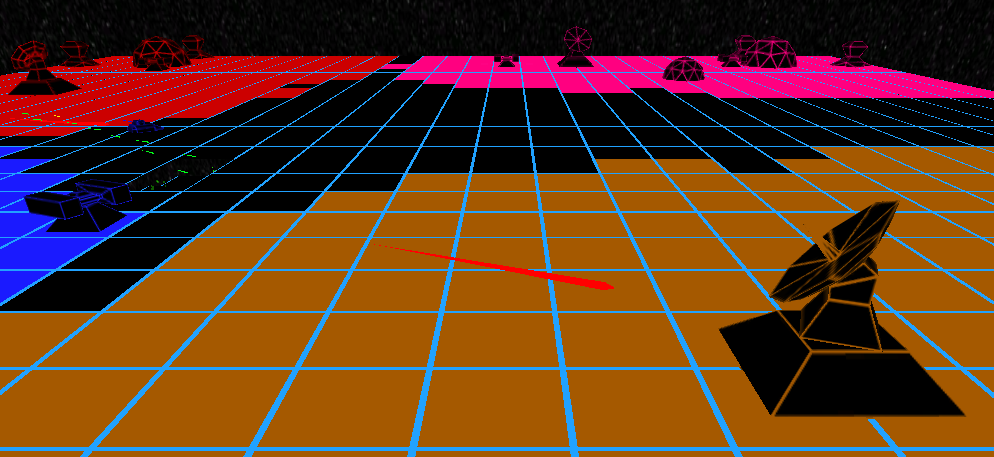
This is the basic concept behind BattleGrid and one of the more unique concepts in the game. (I’m sure it’s been done before, but I haven’t seen many games with it.) Each player has a certain area that they control. This area is colored with their player color and it is only within this area that a player can build. Control is spread by outposts, which claim grid cells within a short range around them.

Top-down view of a game in progress, showing the control areas of each player

If two players both have outposts that claim a cell, that cell becomes “contested”. Contested cells can’t be built on by either player. This makes quick expansion using outposts an effective way to limit another player’s expansion. Any structures built on a cell before it becomes contested remain active.

Contested area between red, blue, and orange players
The grayish area between the orange, red, and blue outposts is contested

If a player loses control of a cell containing one of their structures, that structure becomes neutralized. Neutralized structures don’t function, and can be claimed by the first player to control the cells the structure is built on. Structures in contested areas are particularly vulnerable, since the last player to keep control over the area claims all structures within it.

A neutralized blaster turret

Bitstreams
Bitstreams are the resource points in BattleGrid. Controlling these is vital because they provide a constant stream of bits for building new structures.To harvest bits from a bitstream, you have to build an Extractor on them.

A bitstream
A bitstream

Priority Targets
This is a big part of the “no micromanagement” in BattleGrid. Instead of commanding individual turrets or units, the player simply picks out certain targets to prioritize. Any turret or unit that can fire on a prioritized target will do so. Mobile units will immediately change course to get in firing range of any prioritized targets. If no targets are prioritized, units will attack whatever enemy is closest.

A prioritized target

Factories and Units
Factories build units. Each factory can support 5 units, and will automatically build new units as slots are available. Units are entirely autonomous – the player can’t control them directly. Instead, the units will attack anything designated by the player as a priority target, or will spread out and attack nearby enemies if no targets are prioritized.

A tank factory (building a tank)

The constant flow of units from factories make them a valuable structure, but the factory itself is relatively weak and must be protected. Units are weaker than turrets, but make up for it in numbers. If the factory is destroyed, however, every unit it supports will immediately be destroyed.

A tank fighting a missile turret

In the course of taking these pictures, I have decided that I really need to tone down the pink player color…

Categories
Projects

BattleGrid Details – Structures and Units

BattleGrid structures are divided into three categories: base structures, turrets, and factories.

Base Structures
These are the basic structures that form the backbone of your base.
Outposts expand your cache and control, so they’re necessary to expand your cache so you can build the more expensive factories and artillery.
Extractors harvest resources.
Shields act as a defensive structure, projecting a large shield dome that protects anything within it. Shields are very tough and recharge, but can drop quickly under sustained, concentrated fire.

Turrets
Turrets are your primary defensive structure, though they’re equally effective when used offensively.
Blaster Turrets are cheap, short range, and rapid firing – they act as the best deterrent to units from factories, but are also effective against any other turrets in their range.
Missile Turrets are more expensive, but have a greater range and 100% accuracy, thanks to their tracking missiles. These will usually form your main defense early in the game, since their longer range makes them effective against most units.
Artillery Turrets are the best offensive structure in the game. They’re slow firing and inaccurate, but they deal splash damage and have extremely long range. They’re relatively weak, though, so they need to be protected by other turrets.

Factories
Factories produce your mobile units. These units will move to attack any priority targets, or will spread out and attack whatever is closest to them. Factories come in three flavors:
Tank Factories produce tanks. Tanks are slow but strong, and are able to take a bit of punishment before dying.
Recon Factories produce recon tanks. Recon tanks are the opposite of tanks – they’re quick but weak. They make effective anti-artillery units since they’re able to quickly get within the artillery’s minimum range and fire away at it.
Laser Factories produce laser tanks. Laser tanks are fairly weak, but have a steady laser beam weapon that will always hit and slowly eats away at enemies. This makes them perfect against other units and the weaker turrets.

Categories
Projects

BattleGrid

So I’ve been working on a game for about a year and a half that is tentatively called “BattleGrid”. It’s what I call a “casual RTS” game – it has most of the components of a traditional RTS game like building bases and commanding units, but without a lot of the micromanagement of resources and units.

I started this blog to show off some of my personal projects and get feedback, so I’ve just posted the first public image of my game. I think up to this point, only a few friends and family have seen it. It’s not a full screen shot (since I’m planning on redoing most of the UI, anyway), but it shows the art style and some of the effects.

Here goes…

A missile turret attacking an outpost

Eventually, I’ll be doing some testing of the game through this website – the game is made in Unity, so it’s easy to build a browser-based version for testing.

I’m aiming to have the game playable on the iPad by April. My plan is to solicit feedback from random people at PAX East and release sometime later this year.

I don’t usually make New Year’s resolutions (because I almost never try to stick to them), but my one serious one this year was to complete this game. We’ll see how that goes, and this blog will track my success or failure.

For more information about the game, I’ve got a project page available here. Over the next few days/weeks, I’ll provide more details about the game and add more screenshots and videos.