I made these using a Photoshop and a video tutorial.
Like most people, I like to make some resolutions every year to work towards. Unlike many people, I try to make sure mine are realistic. So this year, here are a few things I’d like to do:
Blog More
I like writing but I’d never claim to be very good at it. I’ve written little stories in the past and I’ll come up with storylines in my head (usually for games), but I rarely try to create anything “complete”. And while blogging isn’t the same as writing a story, the more I write the better I’ll become. So this seems like a good place to start, and more importantly: low effort and fun. To that end, I’m planning on blogging a bit more. Maybe even get back into Twittering, since I’ve been doing much less of that lately.
Finish Tunnel Racer’s Rebirth (Or at least get closer.)
I’ve started a draft for a blog post about Tunnel Racer’s rebirth as 8 (which I think is the current working title for the game), which will go into more detail about what’s been done since my last post about Tunnel Racer. I’ve been slacking a bit on the project – between work and life I just haven’t felt the same urge to work on it. That said, I’ve been itching to get back to it, and I want to put some real effort into finishing what needs to be finished. It’s come a long way since the end of Tunnel Racer, but there’s still tons of work to do.
Restart Work on BattleGrid
Between work on Tunnel Racer’s new incarnation, I’d like to go back to working on BattleGrid. I have some ideas for ways to change it that would make it much more fun. I never wanted to abandon BattleGrid before, but it was getting too complicated for me and I was starting to struggle with it. Now that I’ve got some new tools and some new ideas, I should be able to fix it and improve on it.
Finish Some Games
I have a huge backlog of Steam games to play, and a giant wishlist on Steam at the same time. I want to power through a few of those games so I can get them out of my backlog, and clean up my wish list so I don’t have as much junk in there. I have a bad habit of wishlisting anything that looks remotely interesting, which ends up being just about everything.
There’s always more I’d like to do, but these seem attainable. The ones I’m really hoping to hit are my development-related ones, since I still want to get a game finished, and as I’ve said every year for the past few years: this is the year I finish and publish one.
Every year for Christmas, my parents try to do something unique to make opening all the gifts a bit more fun. Most of the time they just work within a theme (last year all the gifts are labelled with our Hawaiian names after a my parents took a trip to Hawaii) or there may be some interesting gift packages (a Pirates of the Caribbean blu-ray with a giant foam pirate sword and gold doubloon candies), but this year I was completely blown away: My parents created a Christmas dice game.
We started with my dad explaining he rules. There was a die that he had relabeled with a label maker, with sides saying “card”, “stocking”, or “coal”. Each player (there were three of us) sat around a table and took turns rolling the die. While there were no losers – everyone got all their gifts – we decided whoever made it through all their gifts first was the “winner”.
Rolling a “coal” meant you lost your turn.
The tree was divided into three sections using gold ribbon. If you rolled “stocking”, you got to take one stocking from your section of the tree. The stockings had gifts like gift cards or lottery tickets (something my parents did to fill out the stockings – lottery tickets are an unusual gift for us).
Each player had a deck of cards, and rolling “card” meant you got to draw one.
There were three different types of cards:
Gift Cards
Some cards had a letter-number combination that matched a gift and a clue about the gift. These were really hard and often very obtuse (we weren’t really expected to guess most of them). Whether or not you guessed correctly, you still got to open the gift, but if you managed to figure it out, you got to draw another card.
“Give A Gift” Cards
Since we players had no idea this was coming, there were cards that simply said “Give A Gift”, letting us choose one of our presents to give to someone else. This let us make sure that my parents (who weren’t playing the game) still got their gifts along with the rest of us.
“Christmas Hug” Cards
Finally, there were cards saying “Give everyone a Christmas hug!”, where you stood up and gave everyone a hug. No gifts, but still one of our favorite cards. There may have been too many of these, but many hugs were given.
Being a lover of card and board games, I really enjoyed this. We all had a ton of fun and everything worked out perfectly. Apparently my parents had been planning this all year and despite some setbacks late in the year (life surprises you sometimes), everything went really smoothly and the planning put into it really shows. I can’t wait to see what we do next year, even if it’s the same game.
Back in May, I ordered an Oculus Rift Dev kit. I’ve been excited about it for a while and held out as long as I could, but the excitement finally got to me and forced a purchase. I haven’t done any actual development with it (a three-month Unity Pro trial just isn’t enough time), but I’ve been playing a few games and enjoying a few tech demos. I stopped using it for a few weeks because, honestly, I was a little disappointed. I couldn’t find any games that were fun to play, well implemented, and didn’t immediately make me nauseous. I’ve been keeping up with games that introduce support, however, and during my browsing of riftenabled.com, I stumbled on a Steam game that recently started an Oculus Rift beta: Lunar Flight.
My friends know I’ve been addicted to Kerbal Space Program for a while now, so when I saw Lunar Flight was a fancy lunar lander simulator, I was immediately interested. (The words “lunar” and “flight” also caught my attention.) I didn’t already own the game, so I decided to do some investigating. After watching a few YouTube videos of Oculus Rift gameplay, and seeing a few comments saying it was the best Oculus Rift game people have played – and more importantly that it caused no nausea – I decided to give it a try. I was not disappointed.
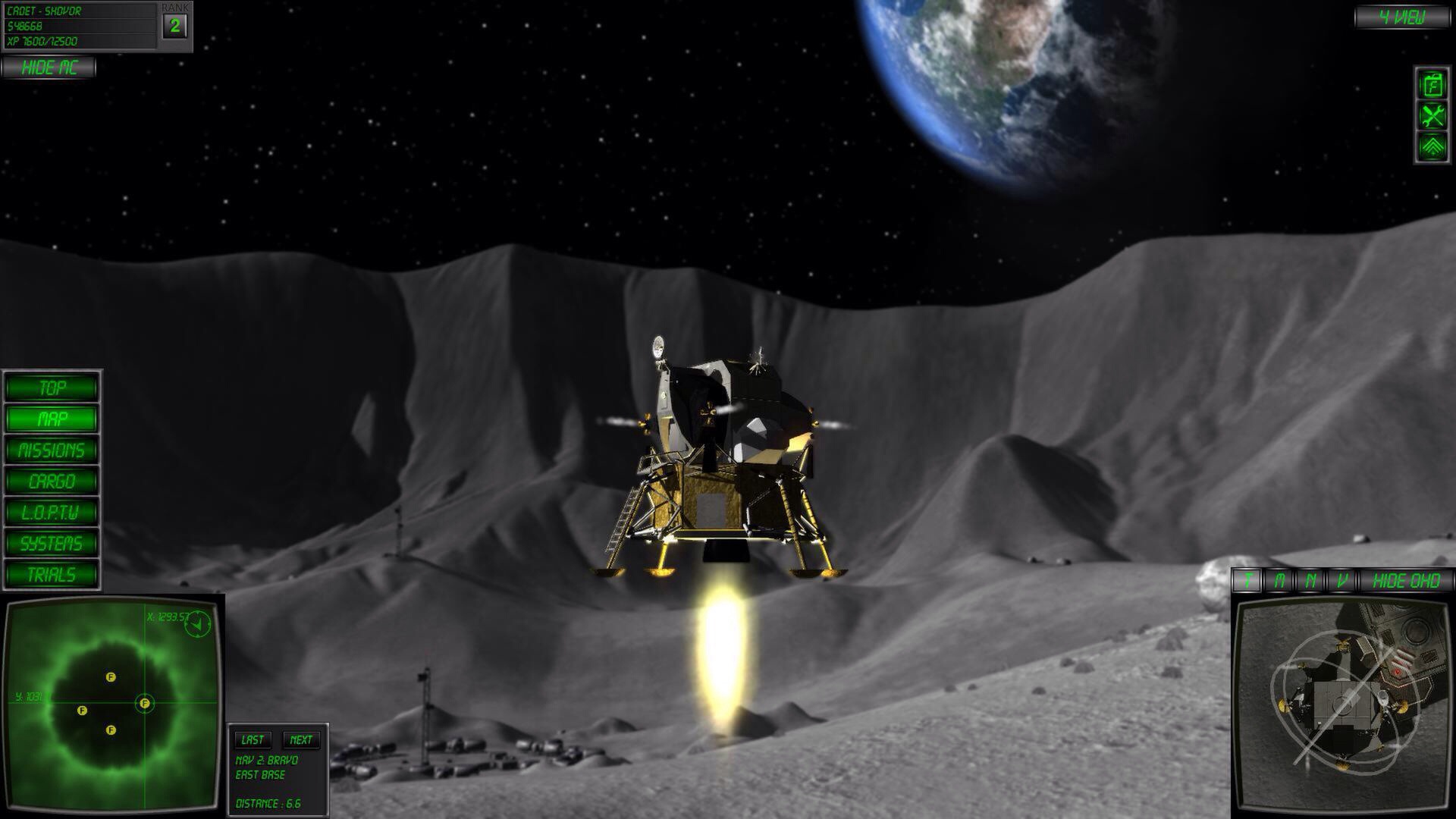
The forum comments were right: Lunar Flight has amazing Oculus Rift support. With the headset on, it’s like you’re in a virtual lander cockpit. You can even see your shoulders when looking left and right, or your feet when looking down. If you look down at your lap, you can even see hands holding an Xbox 360 controller, so the immersion was complete. As you look around the cockpit, there are several displays and buttons you can interact with. When you look at something you can interact with, a context arrow appears and points at that item. When you press the context button on the controller (Y), you press that button or toggle that screen – a simple and elegant solution to the myriad of controls around you.
The game looks fantastic, and looking out the cockpit gives you a nice view of the gray lunar landscape. It’s important that it looks good – you end up seeing a lot of it. But the attractive landscape is just the backdrop to the immersion you feel as you guide your lander from base to base, transporting cargo or surveying the area. There’s a display above you that shows (by default) your destination along your velocity vector. It feels fantastic when I get close to a landing pad and use that monitor to line up my landing, then glance down at my fuel meter, out the window to make sure nothing is getting too close, then back at that monitor to make any other adjustments. It’s hard to describe… It just feels right. I know I’m sitting in a dark room with a weird HMD on my face, but it feels like I’m sitting in a lunar lander controlling it’s decent, checking my thrust-to-weight ratios, checking my fuel, navigating from place to place… Because I am. It’s like nothing I’ve played before and finally makes the Oculus Rift seem like the amazing piece of technology that it is.
So after weeks of doing nothing with my fancy VR headset, I finally have a game I play nightly and enjoy immensely. Hopefully I’ll find more in the future, and I hope some developers out there are paying attention to the games that do VR right.
But there’s no need to mourn Tunnel Racer. See, I was contacted by a couple guys in California who have started a little indie game development company called Homunkulus. Their lead designer had an idea for a tunnel racing game and when they were doing a little research on their “competition”, they stumbled upon Tunnel Racer and liked what I was doing.
We chatted over Skype a few weeks ago and I really liked their ideas. When I started Tunnel Racer, I was just going for a simple “endless running” game with a retro art style. The guys at Homonkulus have a much more fleshed-out game design, and what I’ve done with Tunnel Racer actually fits into it quite nicely.
So, we’ve decided we’re going to work together to create this tunnel racing game of theirs and publish it. They’ll be adding to the game and handling a lot of the bits I’m no good at (sound, some art, and businessy stuff), and I get to continue working on this tunnel racing game.
Together, I think we’ll make a much better product sooner, and I think my work gives them a good head start, so we all benefit. I’m excited to work on this new game, but I’ll have to hash out with them what details I can provide here… I’d like to keep blogging about Tunnel Racer, but this is their baby as much as mine now, and I’m not sure how much they want me tossing out here on the interwebs. Likely anything specific will be posted to their website, as I have my very own username and password and everything! If anything, I might just post some asides here.
That said, I wanted to throw the final version of Tunnel Racer up here: version 28a. It was in a sort of weird, halfway-ready state when I stopped, so this version has some odd bugs, like the progress bar doesn’t work quite right.
I’ve decided to be a bit more organized with these updates, so this post has the organization I’m planning on using for a while – a short blurb at the top, the link to the current version, a change list, a bug list, and then brainstorming. This should make it easier to get to the interesting stuff. With that said:
Updated the progress bar so it’s a single, smooth progress bar. There were two progress bars previously – if you looked closely you could see a line dividing them. This change should make the progress bar look smooth no matter the resolution.
Switched to a new turning animation. It’s more boring than the old but less error-prone.
Added options menu and options for music and sound. They don’t do anything yet. The checkboxes will enable/disable music or sound entirely and the sliders will adjust volume. I’m thinking the checkboxes aren’t necessary and I could just use the sliders, though.
Changed the “GO” button to a “START” button (to fill out the button better) and changed the font. It’s a little fuzzy now because I’m stretching the font, but I’ll likely replace it with a properly-sized font in the future.
Bugs
Brainstorming
I keep comparing Tunnel Racer to other games I see on the App Store and I get a bit disheartened – I have no idea how I can compete with them. But I forget that this isn’t supposed to a Zynga-toppling mobile game… It’s an experiment and learning experience. I’ve been successful in that regard. I’ve learned a lot, got to learn an entirely new way to program games, and I’ve gotten some experience working with animations.
I want to get this finished and move on to something else, though, so I think the current feature set is going to be it. Four mutators, five ships. Simple, quick to play.
It’s been awhile since I made an update (a month?!), and I’ve been sitting on these changes for a while, so I figured I’d finally post an update.
Changes this version:
The progress bar and explosion move smoothly, rather than jumping to their intended position.
Updated the Accelerator mutator. Instead of gaining speed when ending levels, you gain speed over time.
Removed the level-end sound effect. I still want something to play when ending a level, but I don’t know what yet, and I hated the sound I was using.
Updated the main menu with new mutator descriptions and removed the health stats from the ships.
The speed rating of ships now factors into how much distance you gain when hitting a booster.
Updated most of the spawn patterns that started with boosters so the boosters are now optional and have the same chance to spawn as they do elsewhere (i.e., rarely).
Removed Blitz as a ship option and updated speed values. (I thought Blitz had the most boring ship design.)
Redesigned Alpha.
Removed the testing options on the main menu.
Reorganized the ships on the main menu so they’re ordered by speed.
Added a brief speed boost when picking up a booster, and an animation to go with it. I also changed the boost effect on Alpha – a spray of yellow (to match the boost pickup color) out the engines. I’m not satisfied with it yet, though, and it’s hard to see.
And since I just played it and found some new bugs…
The player and explosion don’t seem to be moving at the same rate. They should always be equidistant from the center of the screen. I think I’ve got a math bug somewhere.
Sometimes you’ll hit a panel that you shouldn’t when changing lanes. (For example: if the lanes are “1-2-3”, changing from 1 to 2 will sometimes hit a panel in 3 as your ship banks.) This bug has been around awhile, but I’m still having trouble getting rid of it.
I like the new mechanics more than the old, so I’ve started ripping out some of the old code and cleaning things up. I’m still trying to get the feel right, though. I need to figure out the best way to handle the speeds, because once things get going pretty fast, collisions start to fail (your ship can glide over panels without hitting them), animations will twitch (resulting in accidental collisions), and other problems start to crop up… I think I might just need to find a better way to control all the animations that occur as you move around.
Brainstorming UI
I need to figure out what options I’m going to allow on the right-side of the main menu. My plan has always been to put the mutators on the left and some game options on the right (like sound/music options), but I don’t know what options I’m going to add. Sound and music settings are obviously important, but what else?
Animations and Effects
I’m still playing with effects – trying to find something that looks good, but isn’t too “loud” is a lot more difficult than I expected. I need some new sound effects, but I don’t know where I want to go with the graphics and sound – realistic or retro? I’ve been using a “retro” theme for everything thus far, but I can’t find an explosion or fire sound effect that doesn’t sound annoying…
The animations when the ship changes lanes, jumps, and boosts are all nice but cause some problems. I need to figure out some way to improve how they work to make them more fluid, and I need to figure out a way to prevent collisions with panels that shouldn’t be hit (like I mentioned in the bug list above).
Player Progression and Achievements
I’m going to start working on implementing ship unlocking and achievements with the next version as well, since these are going to be critical for the final game, and some testing is going to be needed to determine a good progression for unlocking ships.
Tonight’s update is pretty minor. I’m still playing with the new mechanics, but I think I like where things are headed.
Changes this version:
Levels 2+ are shorter.
Boosters have a lower chance to spawn. (Only applies to the places where they can appear randomly, like during the spiral and random patterns.)
The “difficult” patterns (walls and deltas) have a slightly higher chance to spawn.
The health UI has been hidden.
Health pickups have been disabled. (Though sometimes it looks like a health ring will spawn.)
The speed UI has been hidden. It doesn’t really mean much now that speed is locked during each level.
The Doom mutator has been updated so the explosion is constantly gaining on you.
The Sudden Death mutator has been updated so the explosion starts very near you, and a single hit causes it to catch you. (The opening animation doesn’t work out so well yet.)
The Turbo mutator has been updated so you start at max speed and never slow down when hit.
The “near-death effects” (UI shaking, red border) have been updated to display at the same time the warning symbols and skull-and-crossbones appear.
I’ve got plans for the Accelerator mutator, but it’s a bit more involved to change, so I want to get some testing in on the new mechanics before I go in and start making major changes.
And some random brainstorming: UI
If I decided to ditch the speed and health UI elements because of these gameplay changes, then I’ll probably rearrange the UI – maybe put the pause button in the upper-right and the distance bar between the score on the left and the pause button on the right. This would free up a bit of space.
Ships
If health disappears, it means there’s really no need for more than 5 craft if I keep the 1-5 rating for speed. Since there are currently 6 ships, one would likely get dropped, or I’d have to come up with a new reason to have more than 5. I don’t think losing a ship would be a huge loss, but I had been thinking about maybe offering ships as DLC. If there’s no use for more than 5 ships, ship DLC doesn’t make much sense.
I think it’s time for a huge mechanic change, don’t you?
I’ve been thinking about how the game plays and I haven’t been very satisfied, so I thought about it a while and decided to simplify some things. When I introduced the different ships, it made my job a lot more complicated because each ship has different speed multipliers, which makes balance a huge pain – the movement has never felt quite right. Also, the speed levels usually felt too slow or too fast – there was never the “just right” feeling. And now that the giant explosion is in there, I have a few new options for gameplay and decided I’d try something new.
Here’s a list of the mechanic changes in this version:
The only way to die in this version is for the explosion to catch up to you.
Health is disabled. (It shows up, you just don’t lose any health.)
You start the game at what used to be speed 3.
You speed up a bit each level. At level 10, you’re moving at what used to be speed 5.
When you’re hit, you drop to what used to be speed 2 for about a second, then return to full speed.
When you’re hit, the explosion gains on you.
When you pick up a booster, you increase your distance from the explosion.
Each level increases a multiplier applied to the explosion’s speed. There’s currently no maximum speed for the explosion. The multiplier increases by 10% of the base speed each level, so at level 10, the effect is doubled, and at level 20 it’s tripled.
Each level decreases a multiplier applied to your boost speed. Your boost speed decreases by 5% of your base speed each level. The minimum is 10% of the full effect at level 18.
There are a lot of things that will change as I figure out how to balance everything again. In the end, each ship’s speed stat will determine their base speed. Faster ships will be easier to play because they’ll get a bigger boost from each booster. I don’t know if health will return. I think having health and this new boost mechanic conflict with each other, so it’s likely health will disappear entirely. If that happens, several of the mutators will have to change, but I’ve already got ideas on how to modify them to make them work again. (I didn’t bother making any changes to them in this version.)
I’ve mentioned PlayMaker a few times in the past and how I was excited about what could be accomplished with no code. I haven’t explained what I meant by “no code”, so this post is here to clarify what I’m talking about.
Traditionally, developers use a programming language and write code. It may look something like this:
public void TotallyLegitimateExample(string something)
{
if (something == "whatever") DoWhatever();
else if (something == "nothing") DoNothing();
else if (something == "") Panic();
else Die();
}
OK, that’s a stupid example, but it gets the point across – code is typically all text typed out by someone in a particular language to accomplish some task. As a more real-world example, let’s pretend I’ve got some code to control the main gameplay loop for my game:
public class TunnelRacerMainGameLoop
{
public void Start() { ... }
public void StartGame() { ... }
public void StopGame() { ... }
public void PauseGame() { ... }
private void Pause() { ... }
private void Unpause() { ... }
public void LevelComplete() { ... }
public void PlayerKilled { ... }
}
Obviously I’ve left a lot of the details out but hopefully that gives you an idea of how one might separate and code the game loop. Those methods would call out to other things to manage the state of the game.
The entire flow of the game is represented visually. I’m handling events sent by other finite state machines (FSMs) in this loop. For instance, when you click the “GO” button on the main menu, it sends a “StartGame” event to this FSM. (This FSM, in turn, notifies others that the game has started.) When you click the pause button, this FSM gets the “PauseGame” message.
The actual logic is contained inside those states. For instance, in the “Pause Game” state, this is what happens:
Now before your eyes glaze over and roll back in your head, let me try putting that in code:
public void PauseGameClicked()
{
if (IsPaused) Unpause();
else Pause();
}
That isn’t so bad, right? What’s the big deal with all this visual programming garbage, anyway? The thing is, it’s very quick and easy to move things around, rewire them, modify their behavior, or reuse that behavior. These are all things that can be accomplished with code, but we’re visual creatures – displaying it this way makes much more sense and it’s much easier to see what’s going on immediately without having to read through pages of code. This really becomes beneficial when you start getting to more complex FSMs:
Tunnel Racer’s “Health Manager”
I would hope someone without programming skill could get a decent idea of what’s going on there. It’s also very pretty. (Maybe just to me.)
Unity already encourages you to write your code in small, reusable chunks, but PlayMaker takes that a step further with its “actions”. Here’s what happens when you pick up health (“Add Health”):
This is where some programming knowledge comes in. “Float Add” probably doesn’t mean much to most people, but programmers would understand that “Float” means a floating-point type. (In Unity’s C# case, literally the “float” type.) The first action (“Float Add”) adds 1 to a global variable called “Player_Health”. The next action, “Play Sound”, is pretty self explanatory (it plays a sound). The two “Send Event” actions send events to other FSMs. The first action tells the player’s ship that the player has been healed (the “Player_Ship” FSM fires the healing effect). The second action tells the “UI Effects Manager” to stop shaking the UI (which happens when you’re near death). Once those actions are complete, the FSM follows the “FINISHED” event out of “Add Health” to “Update UI”, which updates the health bar in the UI, and then continues along to checking your health, updating effects or killing you.
Hopefully that’s enough to describe what I mean when I say “no code”. I’ve written a few of my own actions for PlayMaker in the last week or two, and I plan on writing several more to simplify some of the actions I keep repeating. Because of the way PlayMaker works, any action I write for Tunnel Racer can be carried into a new project, so over time I’ll slowly build up a nice library of actions to use.
Now, there are some tradeoffs. Certain things that would be simple in code may require multiple actions. For instance, loops are a bit more difficult because you need to manage and wire extra variables in the FSM, whereas in code it’d be a bit cleaner (you still need to do exactly those things, but in a much more compact fashion). In general logic control flow (basically just control loops like “for”, “while”, etc) are more difficult to accomplish, but that’s a minor issue. (And it can likely be alleviated with some custom actions.)
It’s also important to note that I’ve only scratched the surface. FSMs in PlayMaker can get truly huge – imagine a dialog tree in an RPG or a strategic AI for an RTS. They could be enormous, with hundreds of states and thousands of actions. I prefer simplicity, however, so I split up my FSMs whenever they start to become unwieldy. PlayMaker is really impressive in how well it works and how easy it is to use. I’ll definitely be using it in future projects.
Nothing major in this update, but I fixed a gigantic bug where the spiral pattern could start with the first ring being in the wrong orientation, making it impossible to navigate. Oops.
I also added the last of the patterns I had planned, the “Delta” pattern. I haven’t been able to capture a shot of it in-game, so this will have to do:
X
X X
X X
I updated a few graphics that I had oddly scaled in the last version and shrunk the “LEVEL XX” text so it isn’t as huge and distracting as it was before. I fixed the near-death screen border effect – again. (I have no idea why it’s breaking so often…)