Categories
Projects

Tunnel Racer – Visual Programming

I’ve mentioned PlayMaker a few times in the past and how I was excited about what could be accomplished with no code. I haven’t explained what I meant by “no code”, so this post is here to clarify what I’m talking about.

Traditionally, developers use a programming language and write code. It may look something like this:

public void TotallyLegitimateExample(string something)
{
    if (something == "whatever") DoWhatever();
    else if (something == "nothing") DoNothing();
    else if (something == "") Panic();
    else Die();
}

OK, that’s a stupid example, but it gets the point across – code is typically all text typed out by someone in a particular language to accomplish some task. As a more real-world example, let’s pretend I’ve got some code to control the main gameplay loop for my game:

public class TunnelRacerMainGameLoop
{
    public void Start() { ... }

    public void StartGame() { ... }
    public void StopGame() { ... }

    public void PauseGame() { ... }
    private void Pause() { ... }
    private void Unpause() { ... }

    public void LevelComplete() { ... }
    public void PlayerKilled { ... }
}

Obviously I’ve left a lot of the details out but hopefully that gives you an idea of how one might separate and code the game loop. Those methods would call out to other things to manage the state of the game.

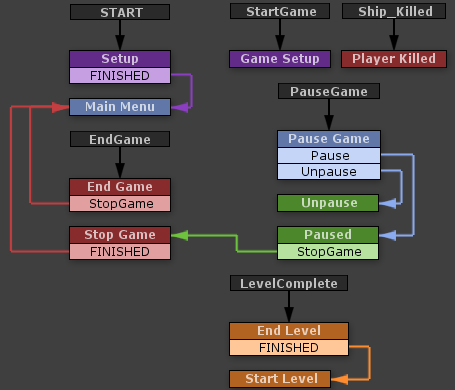
Now, compare that to the visual programming style I use with PlayMaker:

Tunnel Racer's main game loop.
Tunnel Racer’s main game loop.

The entire flow of the game is represented visually. I’m handling events sent by other finite state machines (FSMs) in this loop. For instance, when you click the “GO” button on the main menu, it sends a “StartGame” event to this FSM. (This FSM, in turn, notifies others that the game has started.) When you click the pause button, this FSM gets the “PauseGame” message.

The actual logic is contained inside those states. For instance, in the “Pause Game” state, this is what happens:

"Pause Game" logic

Now before your eyes glaze over and roll back in your head, let me try putting that in code:

public void PauseGameClicked()
{
    if (IsPaused) Unpause();
    else Pause();
}

That isn’t so bad, right? What’s the big deal with all this visual programming garbage, anyway? The thing is, it’s very quick and easy to move things around, rewire them, modify their behavior, or reuse that behavior. These are all things that can be accomplished with code, but we’re visual creatures – displaying it this way makes much more sense and it’s much easier to see what’s going on immediately without having to read through pages of code. This really becomes beneficial when you start getting to more complex FSMs:

Tunnel Racer's Health Manager
Tunnel Racer’s “Health Manager”

I would hope someone without programming skill could get a decent idea of what’s going on there. It’s also very pretty. (Maybe just to me.)

Unity already encourages you to write your code in small, reusable chunks, but PlayMaker takes that a step further with its “actions”. Here’s what happens when you pick up health (“Add Health”):

Add Health Logic

This is where some programming knowledge comes in. “Float Add” probably doesn’t mean much to most people, but programmers would understand that “Float” means a floating-point type. (In Unity’s C# case, literally the “float” type.) The first action (“Float Add”) adds 1 to a global variable called “Player_Health”. The next action, “Play Sound”, is pretty self explanatory (it plays a sound). The two “Send Event” actions send events to other FSMs. The first action tells the player’s ship that the player has been healed (the “Player_Ship” FSM fires the healing effect). The second action tells the “UI Effects Manager” to stop shaking the UI (which happens when you’re near death). Once those actions are complete, the FSM follows the “FINISHED” event out of “Add Health” to “Update UI”, which updates the health bar in the UI, and then continues along to checking your health, updating effects or killing you.

Hopefully that’s enough to describe what I mean when I say “no code”. I’ve written a few of my own actions for PlayMaker in the last week or two, and I plan on writing several more to simplify some of the actions I keep repeating. Because of the way PlayMaker works, any action I write for Tunnel Racer can be carried into a new project, so over time I’ll slowly build up a nice library of actions to use.

Now, there are some tradeoffs. Certain things that would be simple in code may require multiple actions. For instance, loops are a bit more difficult because you need to manage and wire extra variables in the FSM, whereas in code it’d be a bit cleaner (you still need to do exactly those things, but in a much more compact fashion). In general logic control flow (basically just control loops like “for”, “while”, etc) are more difficult to accomplish, but that’s a minor issue. (And it can likely be alleviated with some custom actions.)

It’s also important to note that I’ve only scratched the surface. FSMs in PlayMaker can get truly huge – imagine a dialog tree in an RPG or a strategic AI for an RTS. They could be enormous, with hundreds of states and thousands of actions. I prefer simplicity, however, so I split up my FSMs whenever they start to become unwieldy. PlayMaker is really impressive in how well it works and how easy it is to use. I’ll definitely be using it in future projects.

Categories
Projects

Tunnel Racer v24a

Nothing major in this update, but I fixed a gigantic bug where the spiral pattern could start with the first ring being in the wrong orientation, making it impossible to navigate. Oops.

I also added the last of the patterns I had planned, the “Delta” pattern. I haven’t been able to capture a shot of it in-game, so this will have to do:

   X
  X X
 X   X

I updated a few graphics that I had oddly scaled in the last version and shrunk the “LEVEL XX” text so it isn’t as huge and distracting as it was before. I fixed the near-death screen border effect – again. (I have no idea why it’s breaking so often…)

That’s about it for this version.

Tunnel Racer v24a

Categories
Projects

Tunnel Racer v23a

Well, that was quick… I made a lot of progress today. I expected the changes I had planned to take a few days and that I would likely finish them up this weekend. Instead, things have been pretty easy to modify, so practically all the changes I had planned are already done.

As I noted yesterday, I’ve removed the level intermissions (the short time when you’re cruising with nothing to do). Levels are still in there and the “LEVEL XX” message still appears (though I think I need to shrink it a bit), but there’s no finish line and there’s no delay at the end of the level (the next level starts immediately). I actually like this better – you hit “GO”, and you’re committed until you die. (Or quit. Quitting is still an option. If you’re a quitter.)

The explosion still moves at a constant speed (a bit slower than speed 2), but it gets a small boost when you hit an X panel. If you sit at speed 1 too long, or if you hit too many X’s, it’ll catch up. The boost the explosion gets will eventually increase with each level to a maximum (which will probably be at level 10), but for now it’s a constant boost.

WARNING: SIMPLE ARITHMETIC AHEAD
In this version, I’m using some simple math to calculate the distance between the player and the explosion. For now, here’s how I’m doing it: each speed level for the player adds 50 to their total speed (e.g., speed 1 = 50, speed 5 = 250). The explosion moves at a constant rate of 70, so at speed 1 (50), the explosion will slowly catch up to you. At max speed, you’ll very quickly hit the maximum distance. Every tenth of a second, the distance you’ve traveled is calculated as (speed – explosion speed), then scaled using a multiplier (0.1). So, as an example:
Speed 1: 50 – 70 = -20 * 0.1 = -2
Speed 2: 100 – 70 = 30 * 0.1 = 3

This distance is applied to both the player and explosion equally (in reverse for the explosion). Currently the maximum distance is 300, which may be a bit short (I can easily tweak it later. Once the distance hits zero, the player is killed: game over.

The plan for the X panels is to give the explosion gets a boost equal to the current level number times your current speed level (1 at S1 L1, 50 at S5 L10). The math for this boost is very likely to change as I test it out and figure out what feels right.

Levels work exactly like before. As you travel along, your distance is tallied up and checked against a level distance. Once you meet the target distance, there will be an in-game effect to show that you’ve progressed, your total distance resets (but not your distance from the explosion), and you start the next level.

It still needs some balance, but these changes are coming along nicely. If this all feels right, I might start tweaking the difficulty modifiers and finish adding in some of the calculations mentioned above that aren’t in yet. After that, hopefully it’s just a few more layers of polish before it’s ready to go.

Here’s version 23A: Tunnel Racer v23a

Categories
Projects

Tunnel Racer v22a

Tunnel Racer lacks a story. This is something I’ve known and intended from the start. Why are we in a tunnel? Why are there giant neon panels that explode? I don’t know! You decide! But I’ve always wanted something there to hint at something more – maybe there actually is a reason we’re down here, racing through a tunnel in all kinds of oddly-wireframed craft.

So in this version I’ve introduced something to run from – a giant explosion. If you sit for too long without picking up a booster, it’ll catch you and kill you. (Suddenly there’s a very good reason to pick up those boosters.) Obviously the effects are early, and there’s absolutely no balance to the explosion catch-up rate (it’s a constant, so it’s easy to outrun), but it’s something I can play with in the future.

This version keeps the level mechanic, but my plan is to remove the individual levels in favor of an “endless” style where you just keep running as long as you can, like any of the “endless running” games out there (e.g., Canabalt). The next version will remove the levels, and I’ll include more detail about how the explosion and everything works in that post.

Aside from that, I’m working on fixing some bugs with the movement. I think I’ve got things sorted (I haven’t been able to reproduce the bugs I’ve been fighting), so I’m hopeful that things are working properly. I like the way it feels right now; the ability to shift back-and-forth between two lanes introduces some new dodging techniques that work really well and make some impossible gaps only nearly-impossible to maneuver through.

There are also a ton of new bugs introduced with the new explosion stuff, but for the most part everything still works fine.

Here’s version 22A: Tunnel Racer v22a

(On a side note, the new startup sequence is causing me some major déjà vu, so somebody needs to tell me what game I’m stealing it from.)

Categories
Projects

Tunnel Racer v21a

After playing the iOS build a bit, and armed with feedback from friends at PAX, I’ve come up with some additions to Tunnel Racer that really improve the game. This version contains many more updates than previous versions, so this post is a bit long and image-heavy.

Spawn Patterns
This is something I’ve had in the back of my head for a while, but I had been holding off on working on it. One piece of feedback I’ve been getting since the start is that it’s often too difficult to dodge the X panels. The spawning algorithm has always been random, so sometimes that happens, and I always wrote it off and thought, “it’s supposed to be hard, that’s why you have health.”

This version introduces spawn patterns, which will occur randomly while playing. There are currently 6 patterns:

Tunnel Pattern in Tunnel Racer

Tunnel
Fills the tunnel with X’s except for 1 to 3 clear lanes. Clear lanes start with a booster. It’s easy to spot from a distance.

Pattern-Spiral

Spiral
Creates a path that spirals along the tunnel. Each ring of the spiral has 3 “safe” spots with points, speed, or health. The other 5 lanes have X’s. It’s harder to tell a spiral is incoming, but the slow progression makes it easy to follow.

Pattern-Wall

Wall
A solid wall of X’s 3-5 lanes wide. This one is hard to balance, so it might get scrapped entirely. This pattern causes most of the “that’s impossible” moments in the game.

Pattern-Split

Split
A wall of X’s that blocks a single lane and splits the tunnel. Easy to spot and very easy to dodge.

Rings
There’s a small chance for a “ring” to spawn, which puts the same panel on all sides of the tunnel. Rings are never bombs. They’re usually points, but there’s a chance they’re boosters, and a very small chance they’re health.

Random
Spawns panels at random, like it used to.

Patterns can also modify the chance that another pattern follows them. Right now, I’m experimenting with having a higher chance for a spiral to start after a tunnel (in one of the “safe” lanes). I’m also tracking which lanes are “safe” after each pattern fires, so most patterns will attempt to give you a safe path to follow. It’s not 100% yet, but it seems like there are fewer times when you feel like you were forced to take a hit.

New Level Mechanic
It was suggested that levels end based on distance instead of speed, so I’ve updated some graphics and modified levels to have a set distance you must travel before ramps appear. Boosters have an exponential effect on speed, so the faster you’re traveling, the harder the game is but the quicker you’ll progress to the next level.

Since the end-level trigger is now determined by distance, I decided to replace the ramps with a “finish line” ring:

Not sure how I’m going to explain the jump, though.

Point Panel Icon
I finally came up with a simple icon for the point panels – a diamond. It might still change by the end, but I think this is a good icon for signaling value (without it being a coin).

New point panel

Achievements
Achievements aren’t in the game yet, but I’ve been thinking up some achievements and I’ve got a good list of achievements to add. For iOS, these will be handled by GameCenter. If I publish on Steam, they’ll be Steam achievements. Elsewhere, I suppose I’ll just have to add an in-game achievement manager.

Here are a few I’ve thought up and categorized:

  • High Score – Achievements for high scores.
  • Lifetime Score – Achievements for lifetime scores.
  • Levels – Achievements for level milestones.
  • Unlocks – An achievement for each ship.
  • Total Damage – Achievements for lifetime damage taken.
  • Single-Game Damage – Achievements for damage taken in a single game.
  • Special – Achievements for performing specific actions.

Most of the categories are fairly basic, but the special achievements are where I’m going to have fun. The special achievements may require a bit of luck – if certain patterns appear, they may force you to pick up certain panels that disqualify you for a special achievement. Just throwing out some ideas:

  • Sunday Driver – Remain at the slowest speed for an entire level.
  • Thrifty – Complete a level without picking up any points.
  • Autopilot – Survive 60 seconds without moving.
  • NASCAR – Complete a level using only left turns.
  • Immortal – Reach level 10 in Sudden Death mode.
  • Don’t Fear The Reaper – Reach level 10 in Doom mode.
  • Speed Freak – Reach level 10 in Turbo mode.
  • Lead Foot – Reach level 10 in Accelerator mode.

Some of these names are corny, but they’re not locked down, and you can see where I’m going with these.

Other Stuff
I updated the ship selection section on the main menu. I think it looks a lot better now. At the very least, it shows all the ships, so there’s that. I also finished naming all the ships and added the names to the menu.

I tried changing how turning works, but scrapped most of the work I had done because nothing felt right. I want something smoother, but I also like the tap-to-turn controls I have now.

So, now that all that’s said, here’s the link to the new version:
Tunnel Racer v21a

There are still a few issues with some of the movement changes I’ve made (it acts funny sometimes), and there are a few bugs with patterns (and a big one where it’s possible to miss the end-level finish line and never be able to complete the level), but it’s still playable.

Categories
Projects

Tunnel Racer Update

There’s no new build tonight, just NEWS. I finally got around to renewing my Apple developer license, and I upgraded my Unity iOS license for Unity 4. I wanted to put Tunnel Racer on my iPhone and iPad before PAX (to play with while I was there), and it turns out it worked perfectly. I was surprised.

The best part is that no changes are needed from the version I run on my PC. The controls and UI just work, so there’s nothing special I need to do to make it run on iOS. This is great because it means I don’t have to worry about making changes every time I deploy to iOS. Even the text boxes I added for the testing panel work fine. They’re number-only entries, and on the iPhone, the numpad keyboard pops up. It’s pretty incredible how smoothly everything works.

Oh, and to top it all off, Tunnel Racer runs at 60FPS on my iPhone 4S and 3rd-gen iPad, so it’s as smooth there as it is on my PC (when running in the web player and capped at 60FPS). Framerate is something I struggled with constantly on BattleGrid, so not having to worry about it with Tunnel Racer is refreshing.

And now it’s off to PAX on Thursday to figure out what needs changing. I might even ask some strangers to play it. (Probably not.)

Categories
Projects

Tunnel Racer v20a

SimCity has been dominating my free time lately. I’ve spent a few hours just waiting for servers over the past few days… So that’s why there hasn’t been an update in a few days.

But on to this update. I haven’t changed much. All I’ve added is a new “testing” section to the main menu, that lets you turn on invincibility and override the ship speed settings. This is gearing up for an iOS build that I want to take with me to PAX, so I can play with settings while I’m there and maybe come up with some adjustments for when I get back. I also want to see how everything feels on a touchscreen device.

Tunnel Racer v20a

Categories
Projects

Tunnel Racer v19a

Tonight’s build introduces a new “Doom” mutator, which slowly eats away at your health over time. Health pickups are spawned more often, and bombs are spawned less often. It still needs some balancing (I think it’s a bit too easy).

With this mutator, I also decided to group the mutators so the mutually-exclusive ones can’t be activated together. For instance, you can’t enable both “Accelerator” and “Turbo” anymore, or “Sudden Death” and “Doom”. They’re effectively divided by what they modify – currently just speed and health.

I’ve also added a new UI effect when you’re damaged, and I may have found the source of the level switching bug. I can’t be certain, but I found a place where I was missing a “Level Complete” reset, so it might be fixed. No promises this time.

That’s all for tonight. I’m off to fight with the SimCity servers until I can actually play.

Tunnel Racer v19a

Categories
Projects

Tunnel Racer v18a

I think I’ve got the bugs from last night sorted out, but other than that, not much has changed tonight besides a new effect on the level transition text.

Tunnel Racer v18a

EDIT
I lied. Apparently the level bug is still there, but I still can’t make it happen reliably; so I can’t figure out what’s wrong or how to fix it. Hopefully I’ll accidentally fix it somewhere along the way.

Categories
Projects

Tunnel Racer v16a

Minor fixes to the levels mechanic in this version – the countdown timer only starts once you’ve reached max speed, and you only have to survive for 5 seconds (it’s OK if you hit the X panels now). I’ve also fixed a few problems with the end-level boost not always kicking in. (I think I’ve seen it still fail, but it seems exceedingly rare now.)

That’s it for this version – I didn’t get a lot of time to work on it today.

Tunnel Racer v16a