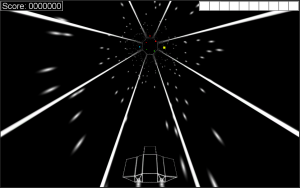
I’ve tried out a few random things that haven’t worked, and I’ve begun adding totally new things. Today introduces game modes. I’m starting with two game modes: “Accelerator”, which gradually increases your speed over time, and “Sudden Death”, which starts your HP at 1 and removes health pickups.
No new screenshot – there’s nothing new to see. Tunnel Racer v5a
Another night, another version. I’m really liking where this game is going. I’m finding it really fun to play myself (a good sign), and the tweaks I’m making to spawning and speed are creating a good difficulty curve. I think it’s still a little too easy, though. Right now I’m not interested in adding difficulty levels (I want to keep things simple), so finding a good balance is critical.
(On a side note, I’ve decided to simplify my version numbers. Instead of v0.4a, I switched to v4a. I’ve also gone back and updated my posts from this weekend.)
Still working on this game. Today I’ve added some new effects, new UI elements, music, a main menu, a pause button, and end game dialog. I also added support for touch (clicking/tapping the left or right half of the screen moves left or right), but it doesn’t make sense to use those controls on a PC.
So I woke up this morning and kept working on this new “Tunnel Racer” game. Aside from some annoying frustrations with PlayMaker (losing my changes…), everything has gone amazingly well. I’m really impressed by how well everything works. That’s said, here’s version 1a:
Blue blocks are points, green are health, red are bombs, and yellow speed you up (increasing your score multiplier). There’s a score, health meter, sound effects… It’s practically a game already.
So I decided to toy with a new idea for a simple game. In about an hour and without a single line of code, I managed to create this:
OK, so it’s not much, but I’m amazed I was able to create this is practically no time (I had to learn how to use a new tool, create the tunnel model, and create the animations) and without any code work.
I used a product called PlayMaker that I bought on sale a while back. PlayMaker makes it easy to create finite state machines (FSMs) that react to almost anything, and what little I did here didn’t require any code. All I had to do was create a few events that were triggered by key presses, then a few other events that were triggered when animations ended. There are only three states – Idle, MoveLeft, and MoveRight, and two objects responding to the commands – the ship (the bomber model from BattleGrid), and the tunnel itself.
Creating this was fun and a good change of pace, so I might try to flesh it out into a real game. It’s a lot simpler than BattleGrid, so maybe I can get it done in a much shorter time frame.
I’ve written in many posts about how much I’ve been dreading working on the music for BattleGrid. It’s something I’d like to learn, but I simply have no skill when it comes to music. Unity has been running an “Asset Store Madness” sale this month, and I picked up a “Retro SFX” pack for half price. Some of the sounds in the pack are similar to some I had created using a simple, free tool I found, but were a better quality, so I’ve started using them where they’re better than what I had.
After using the sound effects, I thought, “Hey, maybe there’s music available, too.” So I did some searching and it turns out there’s some very good music on the asset store. I had to wade through tons of music that wasn’t great or didn’t fit the style of BattleGrid, but a few things I found are perfect – almost exactly what I had in my head but could never reproduce in reality.
Even better, as this is an asset store for a game development platform, several of the tracks are designed to be looped or have sections that can be looped, making it easy to make use of the tracks within a game. And the licenses are appropriately flexible, as well: royalty-free use in practically anything as long as the tracks aren’t able to be redistributed.
So I finally had that epiphany I was hoping for. I should have expected it to come to me as soon as I decided to quit working on it…
I was reading over my last post (in which I decided to quit working on draw calls) and I realized that the majority of the vertices in that vertex buffer are used up by my grid tiles. Although each individual tile only has 4 vertices, the map as a whole uses up a large chunk of the 4000-vertex buffer. My problem was that I was trying to get everything into a single batch – it’s simply not going to happen because there’s too many vertices to batch. So I decided to try something slightly different. Instead of trying to batch everything together, I’ll batch all the tiles together, and all the structures separately. And today, after about 3 minutes of work setting up a new material for just the tiles, I’m down to around 20 draw calls. Well within the iOS “limit” with room to spare. So I’m happy and I can still move on to doing more interesting things.
Trying to get my draw calls down is extremely frustrating. I’m slowly learning what I’m doing that’s causing the batching to break, but I’m also finding out that some of what I want to see (draw call wise) simply isn’t going to happen.
I just found out that the vertex buffer for draw calls is around 4000 vertices (at least as of 2009). For a 30×30 map, my grid alone is 3600 vertices (900 grid tiles * 4 vertices per tile). For a 40×40 map (my largest maps), that comes out to 6400 vertices – already too many to batch. So, trying to get my terrain and structures to batch together is futile anyway. On the other hand, it seems like I should still be able to get down to just a few draw calls. Even if I max out that vertex buffer each time, I should still only be making about 4-5 draw calls, not the 86 I’m seeing. Those 80 extra draw calls are really causing me grief, and Unity can’t be so stupid about ordering things that it can’t properly organize the batches…
So for the time being, I’m going to forget about draw calls and get back to the fun stuff – AI and bug fixing. I’m going to do some optimization to the AI to get it running smoother, then fix the few things that are still slowing things down (like rendering map previews). Maybe I’ll also take a stab at the map submission website. Anything to get my mind off those damned draw calls.
I’ve scaled back my work on BattleGrid a bit. Through February and March, I was working on BattleGrid like it was a second job, and I could definitely feel some pressure building. I was making a big push to get something ready for PAX, and even though I missed that target, I’m happy with the work I got done. It’s just not a sustainable pace.
That said, I’ve been working on the problem I mentioned in my last BattleGrid post – draw calls. I’ve been trying to get batching working properly, and to that end I’ve got my texture atlases set up and all my meshes updated to use the atlas. In theory, a scene in my game should be using less than 10 draw calls: 1 neutral material (for the neutral player and projectiles), 4 colored materials (1 for each player), 2 for the UI (foreground and background), and a few for particle effects. Instead, I get 300 – 400 draw calls. For those of you keeping count, that’s 3x more than before creating the texture atlas and updating all my meshes. It’s the exact opposite of what I expected.
I know the atlas is supposed to work, so there’s obviously something else I’m doing wrong, I just don’t know what yet. Maybe I’ll have an epiphany and realize I’m doing something stupid, or maybe I’ll spin my wheels for a month or two and get very little done. I’m hoping for the epiphany.