I’ve mentioned PlayMaker a few times in the past and how I was excited about what could be accomplished with no code. I haven’t explained what I meant by “no code”, so this post is here to clarify what I’m talking about.
Traditionally, developers use a programming language and write code. It may look something like this:
public void TotallyLegitimateExample(string something)
{
    if (something == "whatever") DoWhatever();
    else if (something == "nothing") DoNothing();
    else if (something == "") Panic();
    else Die();
}
OK, that’s a stupid example, but it gets the point across – code is typically all text typed out by someone in a particular language to accomplish some task. As a more real-world example, let’s pretend I’ve got some code to control the main gameplay loop for my game:
public class TunnelRacerMainGameLoop
{
    public void Start() { ... }

    public void StartGame() { ... }
    public void StopGame() { ... }

    public void PauseGame() { ... }
    private void Pause() { ... }
    private void Unpause() { ... }

    public void LevelComplete() { ... }
    public void PlayerKilled { ... }
}
Obviously I’ve left a lot of the details out but hopefully that gives you an idea of how one might separate and code the game loop. Those methods would call out to other things to manage the state of the game.
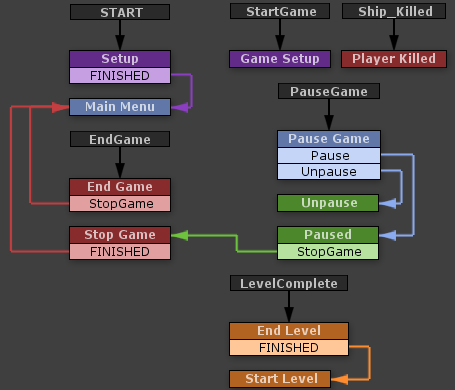
Now, compare that to the visual programming style I use with PlayMaker:

The entire flow of the game is represented visually. I’m handling events sent by other finite state machines (FSMs) in this loop. For instance, when you click the “GO” button on the main menu, it sends a “StartGame” event to this FSM. (This FSM, in turn, notifies others that the game has started.) When you click the pause button, this FSM gets the “PauseGame” message.
The actual logic is contained inside those states. For instance, in the “Pause Game” state, this is what happens:

Now before your eyes glaze over and roll back in your head, let me try putting that in code:
public void PauseGameClicked()
{
    if (IsPaused) Unpause();
    else Pause();
}
That isn’t so bad, right? What’s the big deal with all this visual programming garbage, anyway? The thing is, it’s very quick and easy to move things around, rewire them, modify their behavior, or reuse that behavior. These are all things that can be accomplished with code, but we’re visual creatures – displaying it this way makes much more sense and it’s much easier to see what’s going on immediately without having to read through pages of code. This really becomes beneficial when you start getting to more complex FSMs:

I would hope someone without programming skill could get a decent idea of what’s going on there. It’s also very pretty. (Maybe just to me.)
Unity already encourages you to write your code in small, reusable chunks, but PlayMaker takes that a step further with its “actions”. Here’s what happens when you pick up health (“Add Health”):

This is where some programming knowledge comes in. “Float Add” probably doesn’t mean much to most people, but programmers would understand that “Float” means a floating-point type. (In Unity’s C# case, literally the “float” type.) The first action (“Float Add”) adds 1 to a global variable called “Player_Health”. The next action, “Play Sound”, is pretty self explanatory (it plays a sound). The two “Send Event” actions send events to other FSMs. The first action tells the player’s ship that the player has been healed (the “Player_Ship” FSM fires the healing effect). The second action tells the “UI Effects Manager” to stop shaking the UI (which happens when you’re near death). Once those actions are complete, the FSM follows the “FINISHED” event out of “Add Health” to “Update UI”, which updates the health bar in the UI, and then continues along to checking your health, updating effects or killing you.
Hopefully that’s enough to describe what I mean when I say “no code”. I’ve written a few of my own actions for PlayMaker in the last week or two, and I plan on writing several more to simplify some of the actions I keep repeating. Because of the way PlayMaker works, any action I write for Tunnel Racer can be carried into a new project, so over time I’ll slowly build up a nice library of actions to use.
Now, there are some tradeoffs. Certain things that would be simple in code may require multiple actions. For instance, loops are a bit more difficult because you need to manage and wire extra variables in the FSM, whereas in code it’d be a bit cleaner (you still need to do exactly those things, but in a much more compact fashion). In general logic control flow (basically just control loops like “for”, “while”, etc) are more difficult to accomplish, but that’s a minor issue. (And it can likely be alleviated with some custom actions.)
It’s also important to note that I’ve only scratched the surface. FSMs in PlayMaker can get truly huge – imagine a dialog tree in an RPG or a strategic AI for an RTS. They could be enormous, with hundreds of states and thousands of actions. I prefer simplicity, however, so I split up my FSMs whenever they start to become unwieldy. PlayMaker is really impressive in how well it works and how easy it is to use. I’ll definitely be using it in future projects.